Episode 33: BAU is fun with AI
Download MP3 | Watch on YouTube
Chapters
- 00:00 Coffee and Casual Conversations
- 02:53 Automation in Cloud Infrastructure
- 06:07 Navigating Complex Repositories
- 08:58 The Role of Jira in Development
- 11:58 Ad Hoc Workflows and Planning
- 15:01 Using Work Trees for Parallel Development
- 17:55 Attribution and AI in Development
- 21:02 Managing PRs and Workflows
- 24:06 Productivity with Claude Code and AWS Vault
- 27:17 Exploring AWS CLI and Vault Integration
- 30:51 AI in Workflow Automation
- 32:49 The Cost of AI and Token Management
- 36:01 Enhancements in Cloud Tools and Features
- 39:48 Spec-Driven Development and Code Review Dynamics
- 51:25 Reflections on Spec-Driven Development Challenges
summarize "https://youtu.be/6RsV8yQuB6I" --timestamps --slides
A run‑through of a casual conversation about daily ops work (BAU) made easier with AI agents: the hosts cover how they use Claude Code and an LLM assistant (Claude) to automate infrastructure changes, explore complex repos, manage Jira-linked workflows, parallelize edits with Git worktrees, and handle AWS credentials and troubleshooting.
Morning chat and setup
The video opens with informal banter (coffee, oversleeping, family logistics) and quickly shifts to work context: the speaker has limited time but plenty of actionable tasks, and frames recent days as “insane” but satisfying because they produced tangible results. The tone is conversational and sets up the rest of the session as a practical tour of real BAU tooling rather than a theoretical demo.
Claude Code as an agent for infra automation
Claude Code in auto mode acts like an agent that wakes on events and runs a classic Terraform pull‑request automation flow. The speaker describes a setup where CDK‑TF TypeScript defines infrastructure inside the product repo (a TurboRepo workspace package), the infra package synthesizes Terraform, and Atlantis performs auto plans and applies against a dev workspace. The flow: change infra package → PR shows Terraform plan against dev → dev apply runs and results in a versioned change set → release PR publishes the infra package to a private registry → integration repo picks up the package and promotes releases through integration → staging → prod. Claude Code monitors related repos, triggers Atlantis apply after PR approval, and links infra and container artifacts so infra and Dockerfile changes propagate immutably through environments. The speaker calls this combination “agents plus a fully automated CICD pipeline, uh, is amazing.” (excerpt)
Using Claude to analyze and “shift left” on repo workflows
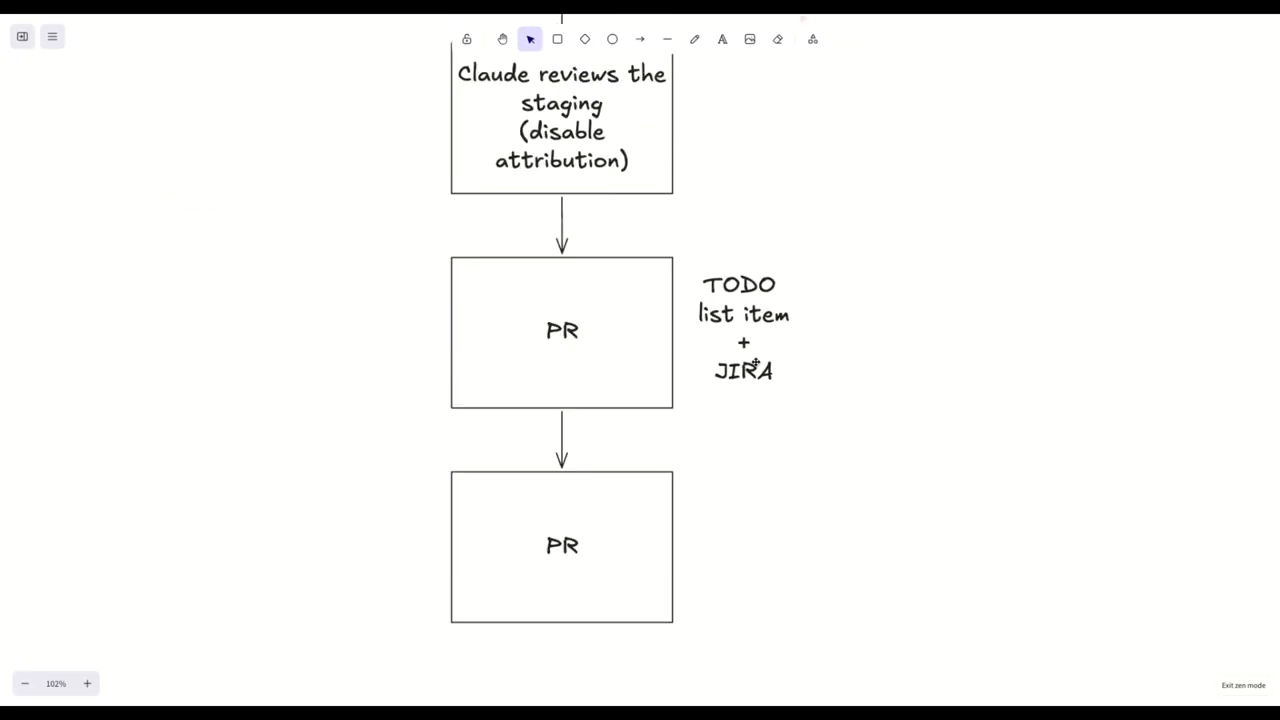
When a repo lacks documentation, the speaker uses Claude to reverse‑engineer workflow from Git history: branches, merges, PR timing and release branch lifecycle (release branches created off master, deleted after production). Claude inspects branches and PRs to recommend target branches for new PRs and helps produce a release‑flow markdown for human review. For multi‑team or legacy repos with many environment branches, Claude gathers context before planning — the recommended pattern is to “go through exploration phases, read some Jira tickets, read some GitHub issues” (excerpt) and optionally have the agent look at Git history to suggest where to apply changes. The speaker emphasizes not revealing which LLM in PRs for internal reasons.
Jira, task tracking, and spec‑driven tradeoffs
The conversation reassesses Jira: earlier hostility to Jira is softened—Jira is described as useful for coordinating team status across environment promotions. The speaker uses a custom Jira CLI/skill that maps board statuses to their workflow and links subtasks to track multi‑PR work (e.g., one Jira ticket coordinating three or four PRs). For startups or tightly spec‑driven repos, the speaker suggests you might avoid Jira and keep everything in Git with a lightweight Kanban overlay, but in enterprise contexts Jira remains practical. They also note spec‑driven content dumped into Jira is the wrong use; Jira is for human coordination.
Worktrees, plan mode, and agent ergonomics
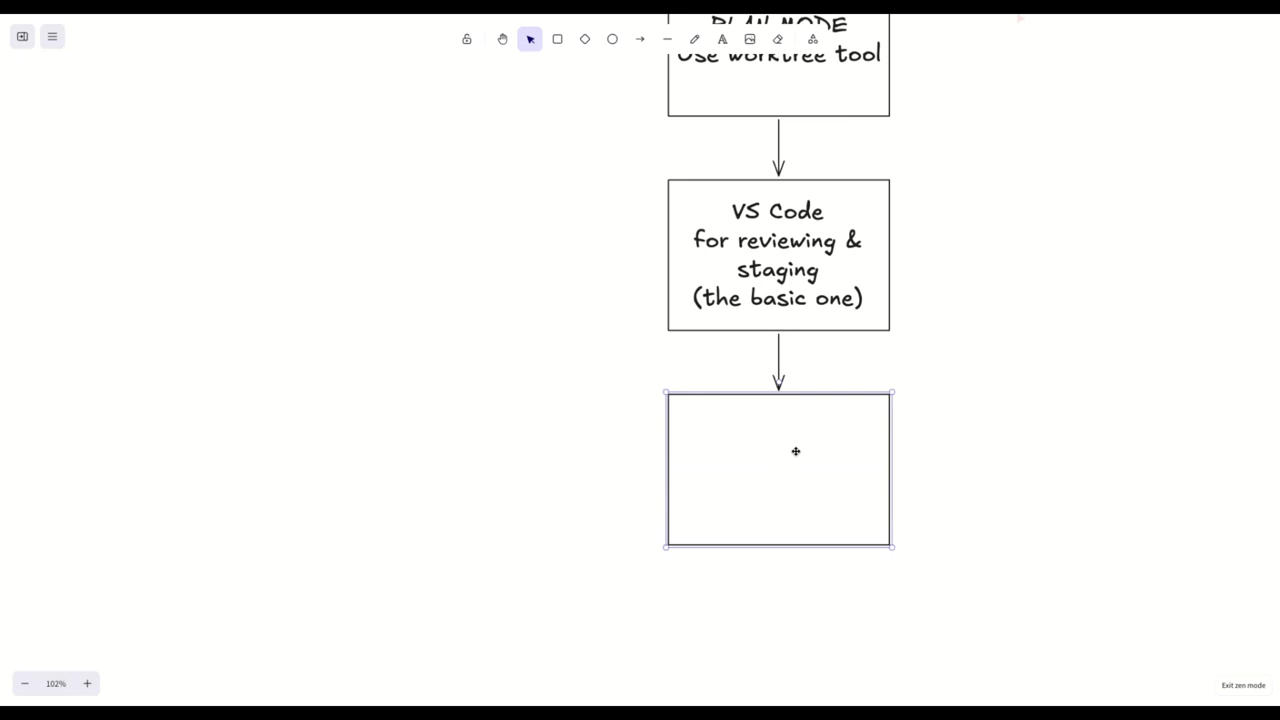
A key operational pattern: avoid entering plan mode immediately in brownfield/ad hoc work; instead run exploration agents first. The workflow described: launch an asynchronous explorer to summarize the repo and relevant issues, then switch into plan mode once scope is clear. Use the Claude Code work tree tool (it creates Git worktree directories under .cloud) so each agent session is isolated in its own checked‑out directory and cleaned up automatically when finished. Benefits: run parallel agents/terminals, stage files in VS Code to inspect diffs before committing, and let agents create PRs per worktree. The speaker stages files manually between agent iterations to verify changes and relies on Claude Code to detect unstaged files during its local verification. They contrast branches vs worktrees: worktrees are separate directories checked out to branches, enabling parallel sessions without full clones.
To‑do tooling, AWS Vault, and troubleshooting remote nodes
Claude Code’s to‑do list tool (session‑ or cross‑session scoped) lets agents persist and drive multiple sub‑tasks without pausing for human prompts; when asked to use to‑do lists, Claude tracks tasks and continues until completion, creating multiple sequential PRs or parallel work where needed. For cloud access the speaker uses AWS Vault (CLI-based, uses OS keychain/pass) to obtain short‑lived credentials and SSO sessions; Claude knows AWS Vault and can list available sessions, launch one, and run commands. The keychain prompts for approval (password/fingerprint) when using credentials. For remote debugging the speaker notes using SSM inventory and run‑commands from an agent to perform network troubleshooting on an EC2 node, and contrasts that with other approaches (cloud shell with an LLM inside it). They close by describing this agent+worktree+Vault pattern as turning tedious multi‑PR ops into a productive parallel workflow that makes BAU feel manageable.
Model: openai/gpt-5-mini
Transcript (auto-generated from YouTube captions)
coffee.
This coffee is amazing.
Oh, [ __ ]
Not not an ad.
Well, you'd have to be in Vietnam. Oh,
they have an address in Sky Garden,
apparently.
But this is egg coffee
with less sugar
than what I usually get for egg coffee.
It's usually super
um
loaded with like condensed milk in
Vietnam.
Uh and they also have a little bit of
like liqueur.
Um it it it adds
a bit of flavor to the like bitter taste
of the coffee.
I don't know what the egg does. The egg
just probably makes it more creamy.
I drink uh
I think usually Ethiopian style light
roasts filter coffee.
>> Okay. I have no idea. It's Vietnamese
for me, I guess. Don't really care.
I'm just sipping the coffee right now.
Yeah, sorry. I overslept. Um but the
good news is that my wife has taken the
kids to school. So, I do have about
well, as much time as you have,
actually. Well, I am constrained. Uh
last few days have been insane, but that
also makes you feel happy, right? When
you have back-to-back not meetings, but
actually like actionable items.
That's really
Well, yeah. I I guess what
Can you talk about what you're working
on or is it
not AI?
>> I guess the the the the most
um funniest like the most
joyful things is where you can kick off
an
an agent
because Claude Code now really acts like
an agent. Claude Code in auto mode and
then you tell it to monitor
and then it um it just wakes up on
events. I I have this um classic
Terraform
pull request-based automation.
Um
but I also have cross repositories
flows. So, I have CDK TF TypeScript
infrastructure defined in the product
repo.
And
the dev environment is using work scoped
a workspace
scoped packages, meaning
you have I have a turbo repo setup, so I
have an
a JavaScript package that defines the
infrastructure, and I have the actual
docker file with either JavaScript or
.NET
applications. And
the infra
app, as it were, synthesizes from the
JavaScript package all of the Terraform
configuration, and Atlantis
um auto plans and applies local changes.
So, you do a PR with a change to the
infra
package. You you change the infra
package, and it automatically shows a
diff
uh Terraform plan against dev.
And then we have a change set.
So, when
um that works but and and
and and and Cloud is amazing. It just
looks at like, "Okay, you know, this is
the dev local workspace scoped package,
and we're making a change to the
infrastructure as code,
and we're we're going to apply that in
dev, and hold on." Uh once that dev
apply has run, and the change set
creates a versioning, and if you have
validated that the IAC changes are
correct, it's kind of like a module,
right? But instead that it is shipped as
a JavaScript package in Code Artifact
private registry. So,
you then merge the release PR that then
releases the infrastructure package, and
then it goes into the integration repo.
So, then it goes against staging and pro
So, it's like pure immutable propagation
of your infrastructure side by side with
your docker file. If you have any
changes to to either, right? If you have
just a docker, you just bump the tags in
the integration repo. If you have
integration changes If sorry, if you
have changes to both your infra, like
new resources that relate to the
service, or like in my case it's
compliance requirements of file system
of the container. So I'm setting
read-only file system with with
whitelisted parts.
And and so this package change to the
container definition. There's no Docker
image change. But it it goes
against dev where it gets validated.
And when it's merged and released
because it's validated, then it gets
promoted to staging.
Integrated and then it gets promoted to
prod all through the integration repo.
And all automated with Claude Code
because Claude Code understands that this
repo links to that repo and and monitors
for the PR to be ready, triggers the
Atlantis apply after the approval from
then.
Maybe it's just cuz I woke up but like
>> [laughter]
>> It's fully automated like Yeah,
>> Agents plus a fully automated CI/CD
pipeline is amazing.
>> that's uh
that's where every pipeline wants to get
to, right? Like uh
Yeah, but that's the thing where I I
mean like as a platform engineer,
But just but just but but just I
what what I wanted to ask was like
I didn't quite understand what the
innovation was with with Cloud. Just
just that's it's integrated as as well
and helping you with with the local
stuff. Would you say it's shifted left?
Yeah, no. I mean like for work I'm I
have a couple of like repos that I
manage fully with spec-driven
development.
But these are just me and my team like
the platform team. And then I have uh
workflows that still depend on other
people and they are highly automated. So
I just tell Cloud the workflow. And
sometimes if there's no docs in the
repo, I ask Cloud to look at the Git
history and figure out the workflow like
look at all the branches, look at the
merges, look at the PRs across branches
cuz I have most of my repos that I
manage and roll out for the last 2 years
are trunk-based. And and you you
basically create a feature branch, you
merge, and then you release and promote.
There's not too many environments. Uh
but they have this legacy repo where
there's so many different
um like environments and they have
environment branches for different
feature work. And um and I'm I've been
trying to simplify it but haven't been
able to do it and there's no even a
proper like documentation. So, I finally
told Claude, "Look, help me understand
this repo and where should I target my
PRs?" And it did everything. It like,
"Okay, I can see that these people these
branches this is when they get created
off master like a release branch gets
created off master. Once it's all the
way to prod, it gets deleted and it gets
another release branch gets created off
master.
Uh and those release branches merge to
master, obviously. So, this is like
has finally [clears throat] solved this
problem for me cuz I've been trying to
understand it
and and then I I asked people like,
"Look, let's make this repo more a
chance agent friendly."
Here's the release from markdown.
Confirm, give me your eyes to confirm
that this um this is correct that um you
know, the the get dissection from the
LLM. I don't mention which LLM for
reasons.
>> [laughter]
>> Uh that the LLM You were talking about
Claude just now.
Yeah, yeah. I I said I don't mention
which LLM for reasons in my pull
requests. Oh. Uh
um so, basically what I'm what I'm
saying
on that side, Claude
has and and and to be honest I know that
we like raged against Jira and you know,
for um you know, local CLI managed task
trackers. At this point with the Jira
CLI and the Jira scale which has some
indicators locally, cuz Jira can be
customized for workflows, right? So, my
Jira scale is very specific. Like, this
is the board. This is the statuses that
you like like you move tickets to and
and and basically use uh sub um
tickets to track the work. Like, because
I'm doing IC work, a lot of it is like
we need to release to dev, and then, you
know, you track the releases in
different sub tickets.
>> where Jira, I think I mean, I I yeah, I
I must
apologize I mean, I'm not apologizing,
but you I've used Jira the wrong way. I
think shoving in the specs that that
like like a STD would generate into Jira
is the wrong thing. Jira is for uh
coordinating with your team members,
keeping people aware of where you are in
the process, right? Like as you said,
like we're moving from something to
from from one environment to the next.
That that having that track across the
board
for coordinating with your colleagues is
still
a Jira and what you and what Jira
arguably does quite well.
I mean, uh
I would say that if it's in place,
it's not hard to integrate. Uh I would
argue that if you're a startup and
you're doing uh or you're building
something, you don't need Jira, right?
You you can create a mono repo, you can
do spec-driven development, you can have
everything in Git
um with some web um
interface on top of it to visualize the
different um you know, the Kanban out of
the the Git.
>> right. Yeah, actually I never got to use
that feature of um Spec Ledger, the
Kanban board.
But yeah, you're right.
Yeah, I mean,
you wouldn't
I mean, there's so many
I I mean, like you just got to remember
like uh hopefully the audience
understands that I'm in a
I'm in a unique position. What am I in a
I I I deal with
enterprises and Jira
as my day job. And then when I'm
experimenting,
I like to uh bemoan about Jira and not
use Jira.
Yeah. Uh so, yeah, that's the kind of
life I lead.
But I started using work trees. Like I'm
not really cuz for work
I don't really have like agent teams at
the moment because the work is very like
um
platform
ad hoc
um you know, compliance changes that I
need to push through
um kernel fixes and so on.
>> very enterprising in a way, but it
sounds very mature maybe is the better
word.
>> It sounds very like if you want to say
legacy, um you know, because I'm I'm I'm
called platform, but I I'm more like
ops, right? I'm in like a sysadmin even
though that I'm I've pushed all of the
sysadmin
work as as as much as possible to mutual
infrastructure with infrastructure as
code and so on.
Um
and and in in in principle a lot of the
other like the product teams are
actually very self-reliant. It's just
that I'm relegated to
like a small slice of of uh of the
operational aspects of like
>> Okay. I think I think
BAU in my workplace uh I think
previously it was
>> is it it's become BAU because the it has
been
thinned out. So, I do have like some
very exciting things that I want to work
on, but I just don't really have much of
like um
I I would say time. I do have time, but
I don't know. Uh but but like what what
I was saying with like cloud, I think
what I really love lately is I tell it
to like I'm not going into plan mode
immediately. I'm going like gathering
context
um
telling it
to create a work tree
to then go into a plan.
Um
You tell it to go to do a couple of
things first to gather its context. Like
read this Jira ticket, read this GitHub
issue.
>> Yeah, like
what stops you from using Git work tree
from the very start? I can't understand.
>> plan because if you go into plan, then
it's like I'm in read-only mode. I can't
do anything that that affects the state.
I don't think you can make it go into a
a work tree while it's in plan mode.
Okay. Okay.
>> So so my my original flow was like open
Claude Code, switch to plan mode, plan
and make a plan. Talk talk cuz my brain
my brain isn't working without some
drawing. Did Did Did you see that link I
sent you?
Just draw.
>> Yeah, I'm I'm I'm in the in the call and
you're not sharing the screen if you
want to share it.
>> Okay, I'll share I'll share the screen.
You do the You do the drawing.
Draw.
I don't know how to draw.
You don't know how to draw?
Okay, let let me show you. Let me
demonstrate how to do the drawing.
>> talk about the first flow.
Um You draw the drawing.
>> Maybe we're Here we're specifically
talking about more
like
>> You You type on the screen.
Yeah, I I ad hoc work in in in brown
brown field
uh or established repositories.
>> Oh, uh you want to make a title.
ad hoc h o c work in
I'm just going to dictate.
We should have an AI like you know The
AI The AI is pretty good for this sort
of stuff.
What do you mean like if you give it a
description and then it generates an
um like a mermaid graph and then renders
a basic
mermaid
visualization. No, well, I can actually
show you. Hold on. I
um
>> I know I don't want to waste time.
Basically, what I want to say is for ad
hoc work in a brown field repo
my original flow would be to immediately
go into plan mode and then, you know,
iterate on the plan until I know what to
do, right?
>> Okay.
Plan.
>> But
but it gets very frustrating because
there's always something like not 100%
right, but I don't want to be bothered
with like opening the plan, editing it,
or asking it to make a change cuz I I
feel it's taking too too much time once
the plan is rather big. So, Okay, you're
big and you you're so big on this sort
of plan stuff. I I'm actually
>> No, you didn't even listen.
So, I said my original flow would have
been to go into plan mode and then
iterate on the plan and then kick off
the plan for ad hoc work. Um
>> Okay.
because
Okay.
>> ad hoc work in a brownfield repo means
you have to go and explore the the
things. You have to agree on where to
make the changes because the AI might go
wrong and miss something. So, I want to
align with the AI first. Uh and then
ad hoc work in a brownfield repo today
for me is more like do not go into plan
mode,
go through exploration phases, read some
Jira tickets, read some GitHub issues,
um
launch an asynchronous explore agent at
the in the background to get the summary
on on the repo,
uh and relevant in parts for what we
have learned from those. And then, after
that, go into a plan mode.
Uh maybe maybe even like use the Git
worktree. So, this particular session is
living in a separate worktree. And if
you do that, you have to tell it like to
use the worktree tool cuz otherwise it's
going to run Git worktree. But, if you
use the clone Claude Code Git worktree
tool, it's going to automatically put
the session inside that worktree folder.
And then, when you're done, it's going
to clean up the worktree automatically
as well.
Because so, this is where you activate
worktree mode or whatever it's called.
You use a worktree tool.
It's not a mode. So, the plan mode is
like um like a mode that controls what
the agent is allowed to do like the
sandbox uh permissions. The worktree
tool is just a tool that um
changes the environment and and
automatically locks the session to a
certain worktree, which is great because
then you can open a second terminal and
launch another cloud and do a parallel
ticket or whatever. And also
>> is this is what I was going to ask you.
So, this is what you do. So, you work in
parallel thanks to thanks to work tree.
That That's the chief That's the thing
that work tree enables.
Yeah, and that's before I have like
exact scope of like launching agents and
an orchestrator doing everything right.
I'm I'm still very much a driver here
because this is a
more than 3-year-old code base that I
that I know very well. And I just I
pretty much know where the changes need
to happen.
Um and there's a whole bunch of things.
>> on that sort of
thing you just said, driver.
I was looking at that old pairing uh
article on ThoughtWorks.
And the driver and navigator
paradigm is brought up. And then the
driver, of course, is the person who's
writing the code. So, so technically so
technically you're the navigator. Okay.
Uh so so yeah, I mean, because now I
have like like I have VS Code because I
still like to use VS Code to open the
diffs and also to stage files. So, then
I can see
if I don't really want to do the commit,
I I go into the the Git like extension
to stage some files before I give the
next extent command cuz I want to see
exactly what is it changing without
blocking the agents for changing those
files. And then in the VS Code Git
extension, you actually see every work
tree separately. So, you can see the
diffs of every Oh, like the the very
basic one because I was finding the
basic Yeah, you have the other one which
is like GitLens,
uh which which gives you a lot of cool
stuff, but I'm not using anything.
Yeah, I really I really hate the basic
one. Doesn't seem to be able to have the
ability to step through
uh
Oh, I can't remember what it's missing
now, but it was frustrating for some
reason. Okay. And and
And then like I like to stage things in
between
um because I want to know what exactly
changes based on my prompt. And
then
if I'm happy with that by the time I
want to commit, uh I say I usually say I
already staged everything that I want to
commit. Um but Claude codes locally
usually does a verification. It does
actually check if you change stages and
then it will say, "Hey, but there's this
other file we did that you haven't
staged." And I'm like, "Oops, yeah,
you're right."
I'm actually surprised you managed to
get Claude to do that cuz sometimes
I mean, maybe it's me just being lazy,
but like I mean, I'm talking from
personal experience. I'm not actually
using Claude in anger on a on a client
project. But like it just commits for
me, right? Like
No, I I I
Anyway, um what I I think about
I had something I was thinking about. Uh
I forgot.
Yeah, I know. Attribution. Cuz on on one
project I disabled uh the the Claude
attribution completely. Oh,
you're so naughty. Very naughty.
>> For for for hashtag reasons, right? For
hashtags reasons.
Yeah.
There's there's some interesting
articles about that. Like some people
just do that because there's quite a
hostility. And it's very interesting
because we have a contributor to a
project and originally
I suspected AI, but I didn't mind.
Actually, I made I made some comments to
him because he he always opened the PR
and then some of them
uh they were flaky tests and then he
would post a message on Slack saying,
"Hey, there's a flaky test uh that
failed. Can somebody with permissions
retrigger it?" And I was like, "I hope
that by now you have a hook in Claude
that posts this uh Slack message for
you." Cuz he posted it like three times.
And and it's always the same message. So
I was like
that's the perfect reason for Claude to
like go and and and quickly go like you
can
>> Surely it's easy to go up into your
Slack history.
Actually, my my new client uses Slack. I
haven't used Slack for like years now.
So, hopefully it's better than I
remember.
Oh my god, Slack is is is heaven if you
if you've been stuck to MS Teams for a
while. What I really loved just before I
had my last opportunity to use Slack was
that they completely changed the webhook
feature into like an advanced workflow
feature.
And I liked that one. Originally, it was
very frustrating because it used to be
so simple just register webhook and then
paste the webhook URL somewhere else.
But then the workflow was like you don't
need anything else anymore. Like I don't
need
um something else that handles the the
logic to hit the webhook. I could do a
full workflow
um without
with just within Slack.
I'm not quite sure what you mean, but
I'm I'm sure I'm sure to discover it.
Yeah, it's really cool. And I really
miss that.
So, you remove the the attribute
attribute attribute
and then and then do does it go through
a PR phase or do you just land it?
No, no, it has to go every work tree is
is a is a is a branch of of the The work
trees are different branches, right?
That's why Okay, so it's a it's a PR.
Yeah, because it's such a heavy GitOps
type of of setup. Actually, having the
ability to do work trees and PRs, which
you might sometimes in the past say,
"Man, this this GitOps approach is so
annoying, you know, cuz you have to do
so much PRs and stuff just to do
operations." But I think with with
agents, it's actually kind of fun
because they just go off in different
work trees, they do the the different
change I see changes and do the PR. So,
what is a work tree and a branch? Sorry,
I'm
I kind of So, a work tree is a branch of
uh is just a directory checked out
against a certain branch.
So, what's what's what Why not just use
a branch?
Because
a work tree is a directory
>> you're working in the same file.
You're working in the same file.
>> tree
>> is a directory checked out of a
different branch. So, let's say that you
you clone the repo, you're on main, and
you would launch cloud, you tell it um
here's the GitHub issue I want you to
work on, uh and then you do the whole
thing and you say use the work tree
tool, and it it creates and because the
work tree tool doesn't just use Git Git
work tree, which is a command, it
actually uses the Git work tree in the
subdirectory of the cloud uh settings
like the
the dot cloud folder. So, all of your
work trees are managed by cloud in a
subdirectory on the repo. So, when
you're done with your feature, when you
exit or close the session, cloud says,
"Do you want me to clean up the work
tree? Do you want me to clean up this
branch, clean up the the directory,
clean up everything? This PR is landed."
Yeah.
And it also cleans up the remote branch
if you if you're not careful.
Well, normally a merged PR should always
delete the remote branch. No long-lived
branches, no environments branches,
please.
>> [laughter]
[gasps]
>> I need to say don't auto delete. I can't
open this banana.
Um
okay, so you got your P Well, okay, I
got to try work trees. To be honest, I'm
still a dinosaur using branches.
And then what I really like to ask it
in my prompt is to say
um
Like let's let's not talk about the more
like higher-level planning type of
prompts, but in this case it's very
well-defined GitHub issues. The plan is
kind of basic. I don't even go in plan
mode sometimes.
Um I just directly tell it to to like
these are the things I want you to do
based on what it tells me, what's the
status, and what's needs to happen, and
and you know, I have like now this
release workflow markdown document that
I pointed to. So, it tells me, "You need
to do these PRs against these branches,
blah blah blah."
Um
and
then I tell it
like, "Hey, uh use the to-do list items,
and I want you to do these one, two,
three, four five things. Like I am I'm
in this case
you know doing a PR against death and
I
It was different areas that needed to be
done like in parallel. So I wanted it to
create multiple PRs and I and and I
didn't want them in parallel actually no
in this case it wasn't in parallel. I
just tell it you do this PR then you do
this PR then you do this PR and I wanted
him to not lose track of all of the
things.
And it was not in parallel. So so I
actually told it use it to do this item.
I wanted you to you to do deal these
things because otherwise it will keep
coming back to you and say like we have
done this. What is the to do list item?
Is that like a comment in the PR?
>> a tool. So again this is a Claude Code
tool that it tends to use on its own but
just to be explicit.
I like I like your experience and then
we have to talk about your experience
with spec ledger
is because of the to do list tool. It
doesn't come back to you and say like
okay we I've done all of this
should I do do this next? I find if you
tell cloud to use a to do list it will
keep track of everything it needs to do
and it will keep going until all of
those things have been done. It doesn't
pause and say like I've completed one
two three do you want me to go on with
five?
Or four.
Like
>> Yeah I don't think I've ever used this
particular tool.
>> under the hood you don't need to.
So you eat the plan mode uses that. If
if you go out of plan mode usually it
will it will create a list of tasks and
dependencies between tasks of what it
needs to do.
Originally these were session scoped but
then they also became cross session.
>> Okay.
So you're not using these for obvious
reasons cuz I think our every every time
you mention to do I just think
I mean in this case I have Jira right?
And I have a Jira scale that tells it
specifically to track work across sub
tasks and things like that and then I
can also immediately copy paste a Jira
link to to to the team and and inform
people also updated the conference
pages with like these these things are
being closed and so on and
pages with like these these uh, things
are being closed and so on and the
status is very clear.
Um, have weird Jira and workflows and
all that, right?
Yeah, again, this is all like not
[clears throat] the type of work that I
am full agentic
uh, an agent team doesn't do things,
right? I am the navigator.
>> [laughter]
>> And I am I am doing something that I
know very well except I I'm just
pre-planned
um, a whole bunch of things because I
know sometimes I ask Cloud to do the
research and then it tells me what it
needs to do and then I agree with it.
And sometimes I completely know what it
needs to do and I make like a long list
of what you need to do in which order
and then it goes off and does these
things.
And and and on auto mode in the
background using to do list items and
um, in parallel multiple PRs and then I
have multiple Jira tickets, multiple PRs
with sub sub
a PR per sub child. So, one one Jira
ticket actually like has like three or
four PRs and they're all tracked
together. Uh, and then I come back
across my sessions, across my terminals
and then I see a small recap. I was
like, oh, we've done this. This is where
we are. I need your input on this. I was
like, okay.
So, that makes you feel super like
productive because all of the things
that used to take you a day, now you
have like in parallel
you're doing it all and you're doing it
in the
>> mean. Like uh,
these things would sort of break you in
the past but now with Cloud
taking this tedious work out of the
picture, it's it's great. And another
super useful thing is um,
with auto mode
and AWS Vault uh, which gives you
temporary credentials with SSO. So, it
you can you tell it and Cloud actually
knows AWS Vault very well. Uh, I tell it
use AWS Vault and it actually went and
lists to see what are the available
sessions it can create. It launches the
session.
>> Wait a minute. I'm getting confused.
Isn't AWS [snorts] Vault
What is AWS Vault? It's a a command line
binary that uses your operating system
key uh store. It can be OSX keychain on
Mac OS or it can be pass on Ubuntu.
Um if you're on Windows with WSL.
Oh, it's not actually an
an AWS product. It's
>> No, no, it was from but I think the
original company that built it, I forgot
who built it. 99 designs. Yeah, now
Yeah, they just stopped maintaining it,
but it was forked already by the
community. Um
and I love it because I have like you
know, for for the last almost 6 years or
so, I have bootstrap scripts, bootstrap
scripts that basically set up the whole
team with AWS Vault. So, when they clone
the repo, it says in the onboarding, run
this bash script and it runs a bunch of
AWS CLI commands because Vault uses the
AWS CLI profiles and um you know,
secrets. It just automates the the flow
of SSO getting the secrets like the
temporary credentials.
Um
but it can also run in a server mode, so
you can also run it as a demon to to a
Terraform process.
>> the the AWS CLI V2 is a lot better for
SSO management if that if that's
>> Maybe. Yeah. So, I've been using Vault
for since like
I think you think you should give V2 a
try.
Well, I'm not sure.
Yeah, maybe.
But But like for example, because I I I
know someone who used to who is an AWS
uh
professional service or or or um
who works at AWS and
he was sharing information about how do
you get short-lived credentials for your
your agents or your agentic sessions and
he was using this really weird tool and
I was like, but that's something that
Vault AWS Vault does so well because
it's a CLI. It's not I was an MCP. I I
like, why would you use an MCP for that?
Like as a human, I've been using a CLI
for it and it works really well. I don't
even need a scale. I just tell it one
thing, to get
temporary credentials, you use AWS Vault
and then the environment name {dash}
{dash} and then the command you want to
run. And because it uses a keychain to
fetch the secrets,
because the credentials are are stored
in in the So, it does need to re-
re-prompt. So, when Cloud
um wants to access an environment, the
keychain will prompt me if it's more
than 5 minutes between the times that it
needs. And it will tell me like, do you
want to allow the usage of the secret
stored in the keychain? And then I have
to enter my password or fingerprint. And
then Cloud proceeds.
Um so, this was great because I
I wasn't sure if something had shipped
and Cloud went and did a whole
Git
um you know, investigation as well as an
AWS environment investigation, finding
out every single tag live and giving me
like this beautiful I was about to tell
it like, make an HTML because that's in
vogue. But I said, no to that.
>> the one he uses AWS CLI.
It's magical. What one I've I'm I'm sure
I've mentioned this before, but one
thing I've done in the past, which I
thought was pretty cool,
but it's got hashtag problems with it
probably, is that you use the you go
into the AWS console, launch a
CloudShell,
install Cloud or or Codex,
and then set the key and you're and then
inside the CloudShell,
you're basically debugging a particular
environment. And this is handy when you
have about 50 million accounts, but I
guess you could
That's what Vault
>> set up the AWS Vault to
Yeah. Yeah, because because with Vault
I have
I have the script onboarding script that
basically when you when you clone the
repo because in my case it's like it's
It's environment repo.
>> a There was a good reason do it. There
were some crazy VPC restrictions. So,
there's no way I could get from my from
my development laptop.
Wait. VPC but you need the API access.
You just need the AWS service. Maybe you
want to explore against like
uh in the network.
Um Uh for me what what I have crazy
crazy VPC I had SSM I had SSM and and
and telling Claude that we have this
error networking issue and and it goes
and all have any EC2 instance in the
inventory of SSM and then it goes and uh
triggers a run command against that node
and it does a full troubleshoot network
troubleshoot, you know? Uh it's it tells
you the
>> that sounds good. That sounds good.
I mean that sounds that sounds awesome.
So, it sounds like you're you're fully
AI'd your workflow and you're happy and
that's and that's
that's something I I think that's
that's uh
I mean it's my short term
>> like people people like expect so much
from AI. The expectations are so high.
Like if like the fact that I'm happy
using AI and delivering the same amount
of work
um
or happier, sorry.
>> [laughter]
>> The specific
Shouldn't that Shouldn't that be
celebrated? Shouldn't that be um
a wonderful thing?
I guess it I guess it's not really in
the in the scheme of things because I
know in the background that token that
the costs of uh of
of this token expenditure are becoming
realer and realer and more
>> now.
Okay.
But
ignoring the cost of tokens
thanks for sharing that video about uh
the artificial intelligence cuz it made
me think that like Oh yeah, that that
was great. It made me think if Claude
went away tomorrow, I do feel
I could regain
I can keep my workflow because of the
open source ones being so so so good
nowadays. So
Yeah.
>> All good in the hood, man. I'm happy
with that.
Assuming GLM is not [ __ ] and
assuming I can pick up an Nvidia
um hardware. Yeah, I mean, in his
pricing, he really put the price of
local LLM and then because he factors in
the quality, right? Based on some
benchmarks.
Um saying that he he multiplies by the
quality, but I don't think that really
because if your model is a little bit
more dumb,
um it can impact the results
significantly, right? If you have a
model like
So, the the model being dumb is one
thing.
I I think I feel like the the last 30
minutes we've been talking about how
awesome Claude is. I mean, Claude with
its agent support, with its tooling, the
harness, the the you know, the whole
vertical integration, the whole
experience with Claude is pretty
freaking next level, isn't it? I'm I'm
probably probably criminal, but I have
so much budget left.
Well, actually
Well, this is the first time that I'm
only only have like This is on your max
200 or what is it?
No, only one max. So, it's 150 thing
dollars. But the thing is like I'm on
Opus 4.7 x high for like basic stuff.
For like create a commit. That's
criminal, right? I mean,
>> [laughter]
>> that that shouldn't be allowed.
>> I can't help but think that like you
I I I wonder
like Anthropic uh servers,
they must be loaded in in different at
different times in in a day, right?
Absolutely. Yeah, yeah.
>> So, I reckon I reckon Asia's probably
the the lightest touch point, probably.
But they have reduced a lot of those
restrictions since they got the compute
deals with X and CCP, is it? Cuz
originally they were really compute
constraints. And then as soon as they
got those deals announced, immediately
the plans like all these like
How is that even possible? Like how can
they announce a deal and then lift the
restraint? That's crazy.
Yeah, I mean like I I I
obviously yeah, a deal announcement
doesn't mean that it's already deployed.
Yeah, they're they're not running the
servers in space now, are they?
>> [laughter]
>> That's true. Um maybe it's all
marketing. Um Exactly. There's so much
And the guy made some good points like
like if you were sold
uh electricity like you're being sold
tokens and they change the price.
Yeah, he makes very good points about
that. Um this one thing which I also
really like about Cloud is that it
constantly gives you tips and and it
gave me this tip. Um Usually it's a tip
that makes you frustrated because it's
something like, "Oh man, I was I just
had this whole skill built around this
and now there's like a in-built in
feature that does it." Uh but one of
them is like this /team
onboarding tip that I got and I I wasn't
able to take a a screenshot because I
kept going into like prompts and then it
hides the tips. Uh so I had to go to the
/and the team onboarding which I
haven't tried, supposedly um analyzes
your Cloud usage and generate a guide
for your team. Exactly what you've been
always asking Cloud um
I'm calling you Cloud now. Kai, you were
always saying like I I'm using Cloud I
would like I'm a human.
>> [laughter]
>> Um It doesn't help that I know two
people that are called Cloud, so
um so yeah, I mean you've been always
saying like, "How do I share my
experiences with Cloud?" And now there's
a a command for it in Claude Code.
>> Well, there there is
Okay, that sounds really cool. Some Some
of Some of those Anthropic features are
actually
I've got FOMO cuz I miss them like uh
I told I told you about that one thing
before. The uh hold on.
The session report skill. Uh Uh, didn't
know about that. Uh
and I'm I enter that
>> analyze or there's a there's a built-in
one that goes through all of your all of
your usage of Cloud and gives you tips.
>> through all your sessions. There's also
like like an MJS or whatever. What's an
MJS?
>> No, I didn't use a Cloud plugin, but
there's one built-in to Cloud that's
that they recommend you to run as well,
which which go through all of your
sessions and then says, "Hey, this is
how you've been using Cloud. This is
where it excels. This is where you have
to correct it most."
>> this one. This one I think is
>> this one. It's one built-in. It's not
one that you need separately. Okay, now
I'm getting forward. You got to you got
to tell me which one it is. Then these
the other command that I only learned
about
>> Uh, of course the agents I have been
noticing the UI enhancements with
agents.
And uh But I haven't been able to use
that. Like where you supposed to
>> Cloud agents. Like Cloud agents
>> it once and then it launches me in in an
in an empty cell session and says, "Any
agents you create will be managed
through this." And then I was like, "No,
because I have a I have like three
sessions open right now in this
directory. Can you not see them?" And
it's like No, no, it didn't work. It's
like
It didn't even it even refused to
recommend recognize it as a command and
I like kept checking. This is exactly
the right version of Cloud. The agents
command exists, but every time I run it,
it failed.
I really don't understand.
I
Did you see that video I sent you about
the slock sensor?
Uh,
the video slock I I was watching it with
um, at at the restaurant, so I didn't
capture everything, but you finally
found an answer to your um
your question that you kept asking, "How
do I constrain a PR doesn't go above a
certain amount of of of changes?" So,
this guy is the owl.
>> Yeah, and I was pretty happy with the
results. I mean, of course I maybe went
back to front and I need to go front to
back. You know, I I generated a whole
bunch of code and then I got it to like
make 10 PR 10 commits.
I still don't like the premise though.
Why?
What does it matter how long a PR is?
Because it's like
>> You kept saying like how do you keep it
small?
Yeah, but if you have like a 10,000
100,000 line PR
but you're just going to you're just
going to click viewed viewed viewed. I
mean
>> depends, right? I mean like if I'm doing
ball, I've never had a 10,000 line PR. I
usually had like five lines PRs and
they're all split because I'm launching
them the way that I told you. So, I
never have this issue or or the need for
it. And if I'm doing something that
could be a big like spec-driven
development, then I don't care because
it's like complete shift left. I only
care about the user stories. You got a
point. You got a point. I guess it's
more I'm guessing this
I'm I'm hoping to use this. [ __ ] my
Dell monitor is being misbehaving.
Um
I I still think it's kind of useful for
for multiplayer because like if you're
working with someone Mhm. I think it's a
great great approach, honestly. I think
um this is something that that they
recommend to have like hooks and and and
basically silently guide the model with
like injection of messages based on
hooks saying like hey, you know, PR is
getting big or whatever. I think it's
really nice um nice um use case for
this.
Although I don't agree with the premise.
>> [laughter]
>> Yeah, yeah. I mean I mean I haven't
really
Uh you know, it's an idea. It's an idea.
That's That's where I'm at with it. I
think it's a really good idea and I
think some people might really like it.
I'm probably not that audience.
Then um I think someone
I I will think it like I had a comment
yesterday on the video which is kind of
like the same comment I get a lot from
my viewers in a way like let me just
show you.
He says,
it's kind of like
are you still inspecting the commits and
committed messages on on the work you're
reviewing?
On one of the podcasts you mentioned
that um I wasn't reading the code or
something.
But But of course I would read the code
on the client part. This is just to be
clear, I would read the client.
On a on a professional project I would
read the code, I like to think.
But of course a lot of the There's two
parts.
There's a part of There's the
professional Kai and there's the playing
around Kai.
I'm playing around right now. You are
speaking a lot about guardrails, which
is more important than ever, but
and do you review the pro
Anyone build a feature now is but great
would understand the business to be
there. I mean,
I would be on top of it. But this I I
I'm just pointing this out cuz this is a
very typical question I get is like,
you're not reading the code anymore. And
I'm like, no, I'm I'm on it for for for
work, for sure.
>> it it it really depends on where you're
using the agent like we just discussed
with the
the one that I I control, but and and
like you said, there's different types
of projects.
Um
there's also situations where we are
trying to migrate a project from a more
hands-on, every line of code is human
written, towards uh
uh a project that is more AI written,
where where the first step is to
probably
put in the validation and checklists, uh
check like for the for agents to to to
be controlled so that you can worry less
about the code. But to the second part
of the comment saying that um
like he was focused on like product
feature and design and architecture. I
think maybe now you should share a
little bit about your experience with
spec-driven development frameworks,
because that's exactly what That's the
complete shift left, where you are
focused 100% on the architecture, right?
And and you define what the agent should
be doing. Uh
I mean, at least in my case, a lot of
the
the second part So, the first phase is
the user stories, the second part is the
plan and research where you do the
technical design and the architecture. A
lot of that in my case is focused around
how do I organize my code? Do I follow
the repository pattern? Yeah. I like the
way that I I use Spigot the the
development is probably not a great
example because like
I'm creating a Go lang CLI.
Like the architecture with the Go lang
CLI when you're using standard lib is
pretty much already decided, right?
Uh
the only thing that perhaps
is not
super clear when I'm uh working with
Spigot development
is the the guardrails that I want to
implement, the nuances around them.
Documentation,
how that's going to work.
Uh because because Go doc is designed
for uh
for developer documentation.
Uh for example, and then like maybe an
architecture around how the results are
posted back to
some sort of
logging endpoint.
So,
Well, that's that's I mean, that's a
very important part about the language
that you're using, right? Because the
the language in this case, Go lang has a
lot of developer tooling. I love Go doc.
I love the fact I mean, the agent uses
it really well. The agent will go and
say uh run the Go doc command, run the
Go format command, run the Go test
command. Everything that's in this is
within the the language framework and
the agents are aware of it. Even I I've
only contributed, never wrote Rust
myself, contributed to one Rust project
and the agent knew how to do everything
and the guys accepted my PR, so I assume
I assume it's um it's decent. Uh it
wasn't that big.
>> a humble brag that you got something in
the Rust um
No, but it's not the humble brag. It's
just a uh uh um
an illustration of how a language modern
languages and and because you know, if
you talk about node.js, there's so many
flavors. You know, is it still just? Are
you on the latest TypeScript? Are you
using V test biome for linting or
ESLint?
>> Like if you like I think
I SSH to an old machine and
for some reason one of the depends like
one of the go mods had a newer version
of go if I remember correctly and it
just downloaded the new version. Like it
didn't even didn't even like
complain that it was like a out of date
or a new too newer version. It just
downloaded it and got it running. I was
like, "Holy moly, this is nice."
So yeah, going back to STD like um
I'm kind of still on the wall about it
really like
I'm still on the wall about it. I I
guess I'm going to
>> [laughter]
>> Boo. Like for example
maybe you're familiar with open spec.
I still haven't tried it. So you're
ahead of me there.
But like
I have to say reading this blog post
watching your spec it video, it was very
frustrating for me because I spent so
much time with spec
it and modifying it to my wishes and a
lot of the things that you bring up I
feel like I've already solved.
I've I've maybe had these issues and
I've solved it or I found another way of
doing it. And then you did a video where
you spec ledger
and you were using sonae. I'm you mostly
using opus and I'm also always stopping
the model when I know it shouldn't be
doing something and in the video that
you were doing it
it just it it went like on a high it was
on drugs. It was like it was on
ketamine. It just keep going. It's like,
"What is going on?"
I mean this
>> You were completely lost. You totally
didn't know like it's supposed to
um you know stop there because it
suggested Okay, so what happens is
speckit Sorry, speck ledger.
Like I mentioned to you with the to-do
list item with the with the hand-offs
between the different commands and now
that commands became skills so they are
automatically loaded, discovered, and
loaded by the model. I think that
changed a lot uh compared to very
beginning where slash commands were
human initiated. So right now with the
way that the prompts are structured in
speck ledger, when you did the
onboarding flow, it kickstarted the
constitution. It asks you Look, this is
an empty project. These are some good
constitution rules based on your project
name because it was around security. So
it says like you probably want very
strong security principles in this
project. And and then it you you didn't
realize that you were defining your
constitution principles. And then
>> Did I
Did I commit
what I was working on?
So so so it it flew through the
constitution as a project initiation and
discover knowing that this was a
complete new project and knowing that
the workflow should be to set up the
constitution. Then it asked you what do
you want to work on? It immediately
loaded the specified skill and asked you
like what do you want to work on? And
and then you didn't have the um
clarification phase. I mean it it
assumed that it needed to clarify things
by reading the the user stories, but it
never gave you the opportunity to read
the user stories and verify them and
decide what you want to keep, what you
want to score power.
>> Exactly. And normally get from other
people if you work with other people.
Um so it went into the clarify, it says
I'm going to get the the comments left
by other people which is failed because
you didn't share it, you didn't
communicate it. And then it went
straight into um
into task No, into research phase,
right? And and No, and it it did a skill
search. It said like, "Okay, this is a
Go lang CLI at some point." And it found
a whole bunch of Go lang skills and it's
supposed to ask you like which one do
you want to install? And for whatever
reason I couldn't see it in the in the
YouTube recording, it decided not to ask
you to install any skills, and it just
went straight ahead into like task
generation.
>> No, there there was there was a phase
where it was asking me to discover new
new skills using some discovery tool,
but like I was like
>> It did. Like it did search for skills
based on what we knew about the project,
but it never asked you which one you
want to install. It just went on. It
never installed anything as far as I
could see from the YouTube.
Because it's supposed to ask you like,
"Okay, I found these skills. These seem
relevant. Do you want to install them?"
And it does do multi multi-select but at
that point I was thinking
>> your skills or just like skills that are
SSH skills?
This is the Vercel skills registry. So,
it it it it queries the Vercel skills
registry and and it copied So, this was
one binary
that does it that that allows you to do
all of that stuff.
Um
you know, it bootstraps your repo with
the the the skills to to manage a spec
driven development um workflow, and then
it just went haywire all the way. And
then one of my biggest
you know, problems I have with what
happening there was that you didn't
verify the user stories. You didn't give
it any feedback. Um you
because it didn't give you an option,
right? It just kept going, and you
didn't realize, "Hey, we're skipping the
phases here. We need to slow down."
>> Yeah, I mean
but like I suspect
>> on the in the in the in the right window
it was generating so many files. I
thought
>> no. You were getting caught up on the
files, which I was like, "Who cares?"
You keep looking, "Oh my god, files." I
was like, "Yes, of course. There's
prompt files, skills files, spec files,
configuration files."
>> it's just a more it's a relatively
trivial project in a way.
And it was like like 80 files worth of
bureaucracy. I mean, it's a bit
excessive to me.
>> no, no, no. Spec driven development
is a self-contained workflow for
defining
the user stories, buying and like like
buying stakeholder alignment on those
user stories. Like you said, it's a
planning tool and you call it
bureaucracy. You just said like I'm
going to use a planning tool for a for a
CLI, a trivial CLI, and then you say,
"Why is a planning tool for a trivial
CLI generating so much bureaucracy?"
Well,
this is this is what I wanted to like, I
guess I'm left thinking
um
Like I'm guessing you with SpecLedger,
you've obviously focused on
I mean
or may or
What I focused on is to capture the
spec-driven development workflow, making
it more
um visible by creating a web app backend
that shows you these are the steps
because the problem is people don't know
what's the next step. Your biggest
problem with SpecIt was what's my next
step. Now, the problem with SpecLedger
was it flew through every step without
you knowing what was the next step. It
just went, "Oh, now the next step is
this. Oh, now the next step is that."
But I also think that it was running out
of context. And I really don't like that
I couldn't see the context window
because I think Sonar at some point ran
out because I think this is a a 200
token
uh context window with Sonar that we
were using, and I think it just went
even more off the rails because it was
completely out of context and you were
in what they call it, the [ __ ] window.
The the part
Yeah, so so I think that there's
obviously a lot of failings on the
SpecLedger side. I think because of the
way that uh models have a you know,
started loading skills and definitely on
my side
Test.
Yeah, yeah, I'm listening.
>> Trying to reconnect. Make sure you have
a stable connection. I don't know. But
like on on my side because I keep I keep
stopping the model and I've never tried
to let see how far it goes uh and and I
definitely need to put that more in in
the prompts now like you need to buy in
with the user.
>> I'm not allowed to use Opus by the way
because I've been spending too much
money on that.
Um
I yeah, I need to drop because I told
you I had 15 minutes and it's
I have another call and they're being
waiting. I just wondering what the next
steps are here with the my STD
exploration cuz we're still I'm still
like
I think we should do and I know that
that today was supposed to be like a
little recap on the spec driven
development, but I had so much fun in
the last hour on my business as usual
work.
Yeah, that needs to be celebrated. Like
it or not
making BAU tolerable is is actually an
important step here.
Yeah, so sorry I I I really need to
drop.
Okay, no worries. See you, man.
Bye.
Bye-bye.