The Hybrid Meeting Problem
Have we solved the problem of meetings with both in-person and remote attendees?
The problem
Eight people in a room. Five dialled in. Those around the table can read body language, exchange asides and gather around a whiteboard. Remote attendees depend on what the microphone captures and the camera shows, while trying to find a gap to speak.
The hybrid meeting problem is how to let everyone participate fully while retaining the benefits of being together in person.
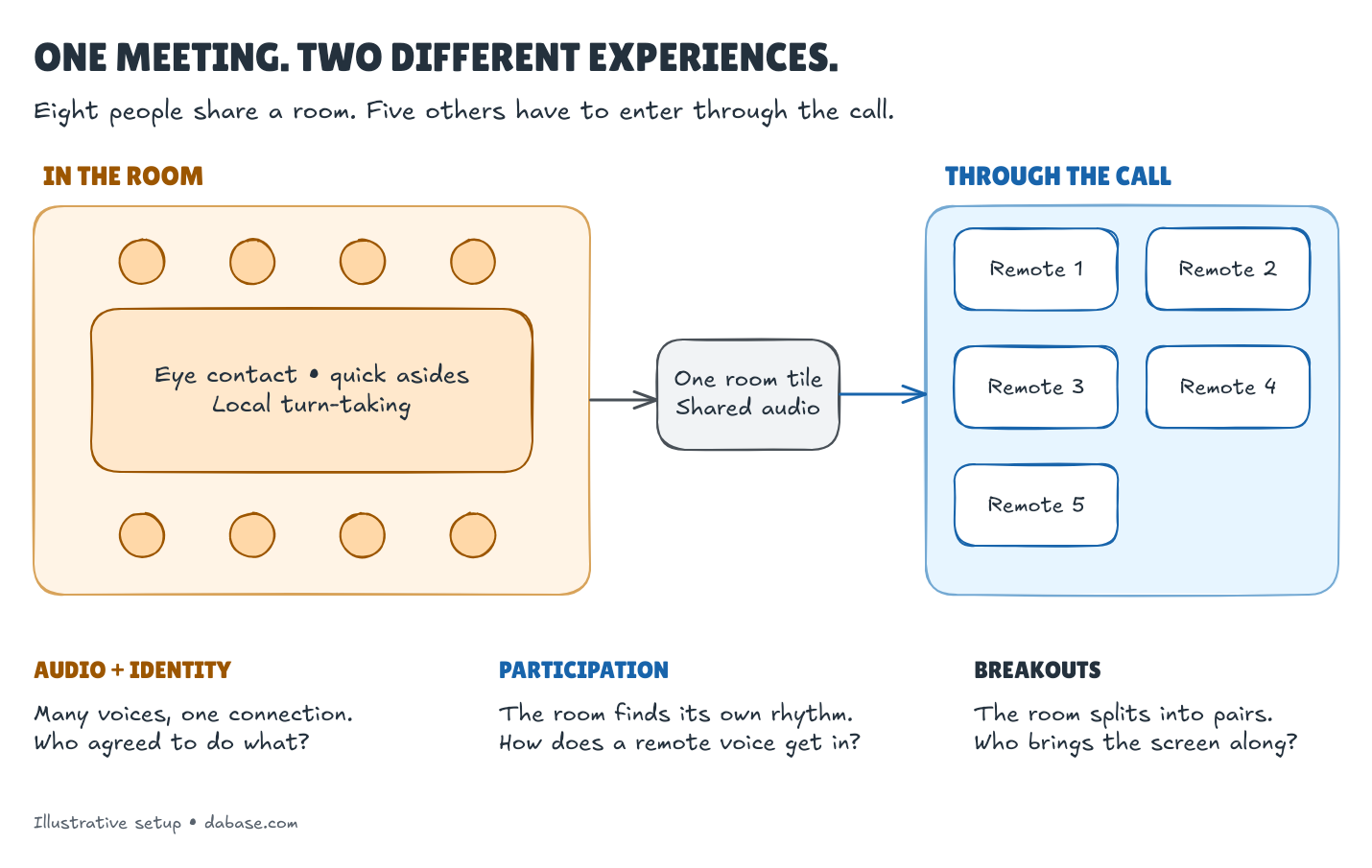
The imbalance carries into the record. Remote attendees have named accounts; the room may appear as one participant. Someone says, “I’ll own it.” Can we establish who?
Two main approaches
Prioritise the people in the room
Run an in-person meeting with a dial-in option. People around the table keep the natural conversation and shared space, but remote attendees risk becoming spectators, missing side conversations and struggling to interrupt.
Prioritise remote participation
If anyone joins remotely, everyone should join the call individually, including each person in the office. That would be my rule: use the same shared documents, chat and speaking queue.
Office attendees can still sit together if the audio setup supports it. Prioritising remote participation needn’t cost them the benefits of being in the same room. Managing microphones and avoiding feedback are practical problems to solve.
Potential solutions
Equip and test the room
Microphones, cameras, screens and room acoustics need to work as a system. Test it through a remote connection with the room occupied: can someone hear every seat, see the speaker, access the shared content and join the discussion?
Constant muting and unmuting is a nuisance, and the platform matters:
- Google Meet’s adaptive audio coordinates nearby laptops’ microphones and speakers, automatically selecting the microphone closest to whoever is speaking. Participants don’t need to mute between turns. It requires an eligible Workspace subscription and cannot be combined with Meet hardware devices.
- With room hardware, Meet’s Companion mode gives each person participation controls while the room handles audio. Cisco’s Webex guidance recommends individual video connections with one shared audio connection to avoid echo.
Organise the whole meeting
A named meeting organiser should own participation and outcomes. Use a shared live agenda, give remote attendees a reliable way to take a turn, and plan their involvement in breakouts. Side conversations and whiteboard work need to reach everyone.
Keep a trustworthy record
When everyone is in the office, a call is optional; recording should still be the default. We can talk face to face and keep a record to revisit afterwards.
We need who said what, when, linked to the recording. Separating voices isn’t the same as knowing names: Zoom Rooms can match enrolled voices, while Otter and Plaud can learn from manual labels. Check names and action owners; flag uncertainty.
Keep the audio, timestamped transcript and shared documents alongside the confirmed decisions. Better AI may help us revisit the recording, but a new transcript shouldn’t silently change what was agreed.
Guidance worth using
These resources cover different parts of the job:
| Resource | Useful for |
|---|---|
| W3C: Hybrid Group Meetings | Microphone coverage, cameras, screens, shared content and speaking queues. |
| W3C: Accessibility of Remote Meetings | Accessible platforms, content and captions. Section 6 covers hybrid meetings; this is working-group guidance, not a formal W3C Recommendation. |
| Google: Room Design Guide (PDF) | Seating, equipment placement, lighting and acoustics, including background-noise targets. |
| Microsoft: Meeting room guidance | Teams room layouts, equipment and infrastructure. |
| AVIXA: Performance Verification | Agreeing tests and documenting results, alongside specific videoconferencing lighting criteria. |
| IETF: Guide to meetings | A working example of shared speaking queues, microphone use and speaker identification. |
Conclusion
In my experience, hybrid meetings are still sorely lacking. I’d start with a simple rule: everyone joins individually when anyone is remote, and we keep a recording even when everyone is together.
For working from home (WFH) to succeed alongside office attendance, remote participation has to work reliably. Leaders calling for a return to office (RTO) should first ask whether they have equipped their rooms and trained their meeting organisers to support it. A badly run hybrid meeting is weak evidence that working from home has failed.
Participants also need to make the effort: come prepared, use suitable equipment, test their audio and connection, and contribute. Those joining remotely need a quiet space and a working microphone and camera. Those in the room need to keep their discussion audible to people dialling in.