Why Enterprises Struggle to Adopt AI
A running list of reasons the fast feedback loop that makes agentic AI work keeps getting bottlenecked and stalled inside large organisations.
A running list of reasons enterprises are slow to get real value from agentic AI, compared to an individual or small team just letting agents rip.
1. Too many humans in the loop

DHH, on why big, established companies with huge engineering headcounts aren’t shipping noticeably faster since agentic coding took off:
As soon as you’re having human teams work together on something, the bottleneck is rarely implementation. It’s human bandwidth and communication. When you have a product manager and a couple of designers and a VP above them and a CTO above them, and everyone wants to be part of the shaping process because we’re all justifying why we’re here, that’s where all the productivity goes to die. The revelation I’ve had working on Omarchy the last three months is that to get that magical 10X, 100X, in a few rare cases, 1000X productivity boost, you have to interact with the agents directly, and you cannot intermediate that bandwidth with another human because it’s simply too slow.
His conclusion: implementation was never the real bottleneck. They’re bottlenecked on ideas, vision, and taste — and agents don’t fix that.
Later in the same conversation he calls this a classic innovator’s dilemma:
These companies have gotten so good, so established at the old way, and therefore their entire structure, management layers, processes are tuned for a time that no longer exists. But you can’t pivot that. These are super tankers.
2. API billing and Max/Pro are different products
 Edit this diagram on Excalidraw
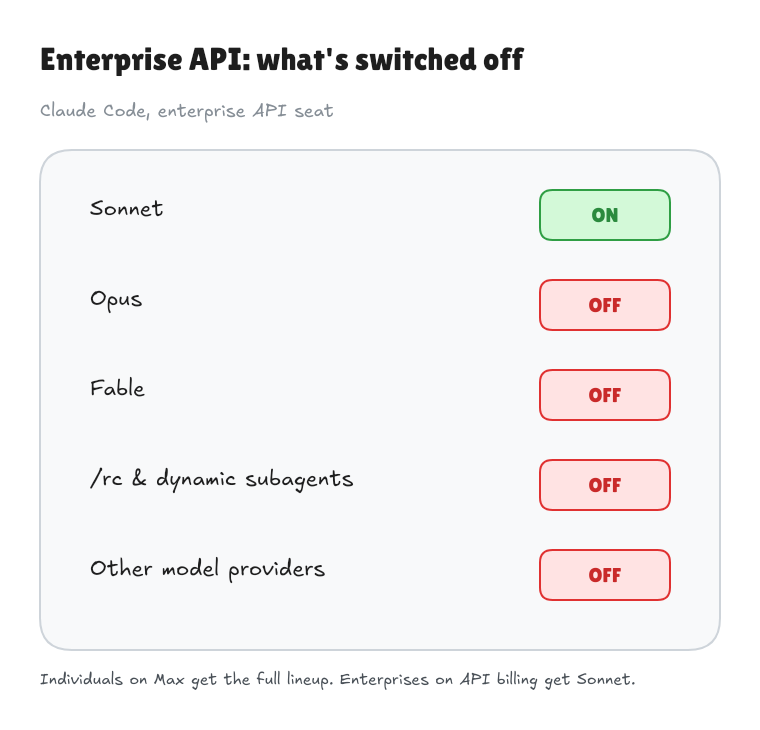
An enterprise’s “API Usage Billing” account can feel worlds apart from Claude Max or OpenAI’s ChatGPT Pro. Those subscriptions bundle usage within plan limits; API access meters consumption separately, with different feature availability. The same coding agent can become a very different product depending on how you sign in.
For enterprises handling sensitive data, a major reason to take the API route is zero data retention (ZDR): keeping prompts and responses out of the provider’s retained logs. A promise not to train on your data doesn’t provide that guarantee, and API billing alone doesn’t enable ZDR.
Anthropic’s announced Enterprise Frontier Safeguards combines ZDR privacy with misuse detection by keeping monitoring data in customer-controlled cloud infrastructure. It’s due to roll out in phases later this autumn, across enterprise products as well as the API. Both Anthropic and OpenAI offer ZDR, but their model coverage, feature exclusions, and safety-retention exceptions differ.
Under GDPR’s storage-limitation principle, personal data must be kept no longer than necessary; zero retention is not a universal requirement. ZDR can reduce exposure, but sending personal data to a model is still processing: lawful basis, processor terms, and international-transfer safeguards where applicable still matter. With EFS, customer-held monitoring logs also need a justified purpose, limited access, and a retention period. Neither a ZDR label nor customer-controlled storage establishes GDPR compliance on its own.
Then procurement and policy narrow access further. In enterprise setups I’ve used, that has meant Sonnet only for cost reasons, no Opus or Fable, no /rc or dynamic subagents, and no other provider to cross-check results. Those are the restrictions I’ve encountered, not inherent limits of every API account; users often can’t tell which come from policy, product availability, or account configuration.
That gap pushes people towards a personal Max or Pro subscription. But sending company data through an unapproved personal account is shadow IT and can defeat the controls procurement selected. The enterprise needs an approved route with enough capability to do the work, or the compliant seat stays underused.
3. Guardrails can bite
 Edit this diagram on Excalidraw
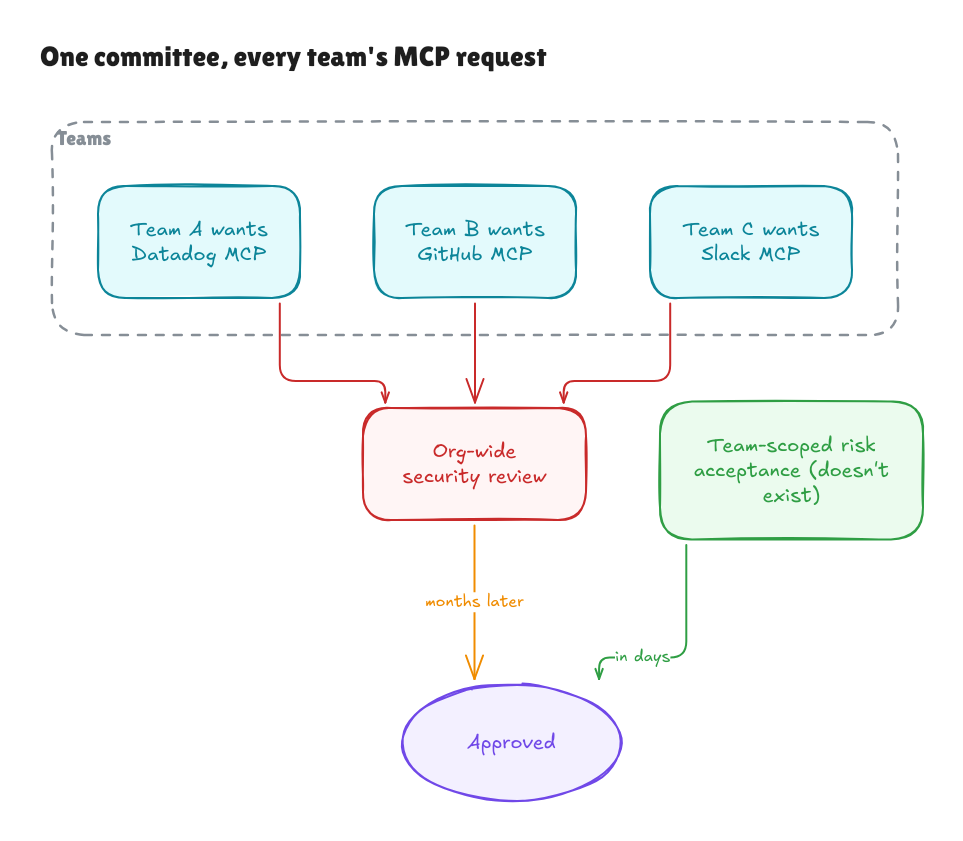
Locking down which MCP servers and skills are available “for safety” has a real cost: it limits experimentation and autonomy — exactly what makes agentic workflows powerful.
Usually, every MCP server needs a formal risk acceptance before anyone can use it — and that policy is set org-wide, not team by team. It’s the same human bottleneck as point 1: a security committee reviewing every MCP for the whole company doesn’t scale, and removes a team’s ability to decide for itself, and be accountable for, the tools it needs. A risk-acceptance process scoped to the team that owns the consequences would move far faster than one that must satisfy every stakeholder in the building.
DHH makes a related point about AI safety guardrails in general, around the 3h32m mark:
Is AI safety important? Yes. Do these models have capabilities that could be seriously harmful in the production of biological weapons or otherwise? Yes. Is it fair to have some ground rules on that? Yes. But then don’t squander it by denying the translation of an essay. Because then you erase the whole thing and you bias everyone towards thinking every guardrail you put up is gonna be bullshit.
Overcautious IT/security policy has the same effect on staff: once a few guardrails clearly exist to cover the org rather than protect anyone, people stop trusting any of them, and stop pushing the tools to their limits.
4. PII, IP, and GDPR block the tools that matter most
 Edit this diagram on Excalidraw
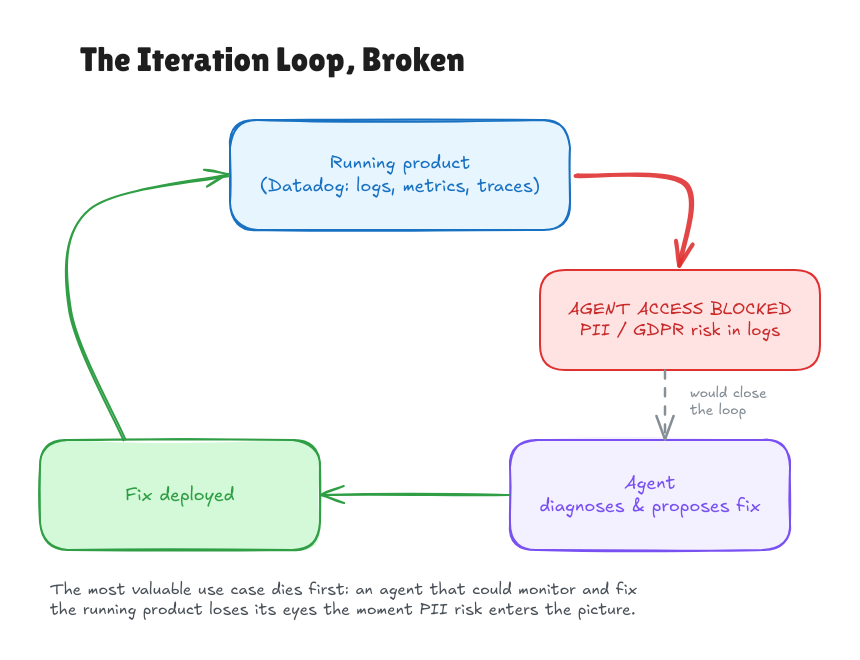
The tool you most want to unleash an agent on is exactly the one an enterprise is most obligated to keep it away from: observability. An agent that can query Datadog directly, correlate a stack trace with a metric spike and a recent deploy, and fix it, closes the loop between “something’s wrong in production” and “it’s fixed” without a human relaying logs back and forth.
But Datadog logs in a large enterprise are likely to contain PII — a user’s email in an error payload, a name in a support ticket synced into a log line, whatever a developer forgot to redact three years ago. Enterprises have real obligations: GDPR compliance, contractual duties to protect customer data, and their own IP not leaking into a third-party model’s context. So the pragmatic, defensible policy is to not give agents access to the logs at all, rather than do the harder work of scoping and redacting what an agent can see.
So the most powerful use case — agents monitoring and fixing the running product — gets killed first, while lower-stakes, lower-value uses (autocomplete, boilerplate generation) sail through because nobody’s PII is at risk.
5. Requirements capture is not done well
Agents removed the implementation bottleneck, which exposes the next one: nobody wrote down what they wanted. There’s no intent.md, no clear use cases, just a vague prompt and a vibe.
Simon Martinelli makes this case reviewing Anthropic’s AI-native SDLC playbook. The playbook compresses requirements into a single prompt session between one person and Claude — never true in an enterprise: “Real projects have several departments with different and often conflicting interests.” Going straight from intent to spec skips analysis, structure, and non-functional requirements, so the spec ends up as prose with no use cases, no domain model, no business rules.
What matters most for accountability: “The product owner no longer writes the spec. They only review it.” A product owner who never worked through the spec won’t catch its gaps — reviewing is a much weaker check than authoring. In an enterprise, where the product owner is often the one person nominally accountable for what gets built, that’s the role you don’t want to hollow out.
Fast implementation on top of an unexamined intent doesn’t remove risk — it gets you to the wrong thing faster, with a paper trail that looks like due diligence happened when it didn’t.
6. Permission prompts break the flow
There’s a second kind of guardrail, applied at the tooling level rather than by policy: not turning on auto mode, or a .claude/settings.json that routes everyday, reversible actions through an “ask” prompt.
{
  "$schema": "https://json.schemastore.org/claude-code-settings.json",
  "permissions": {
    "deny": [
      "Bash(rm *)",
      "Read(./.env)",
      "Read(./secrets/**)"
    ],
    "ask": [
      "Bash(curl *)",
      "Bash(git commit *)"
    ]
  }
}
Auto mode exists to eliminate this friction: it routes tool calls through a classifier that blocks anything irreversible, destructive, or aimed outside your environment, so routine actions don’t need a human to click approve every time. But an explicit permissions.ask rule always wins over auto mode — it’s read as your stated intent to be prompted regardless. So an org can roll out auto mode and get none of the benefit, by leaving git commit in ask.
git commit is local, reversible, and the single most frequent action in a coding agent’s loop. curl is a more defensible one to gate — it can exfiltrate data or pull in arbitrary content — but committing isn’t in the same risk class.
Every entry in ask is a synchronous stop that needs a human present to click approve. That’s fine for an occasional risky command, but a long-running autonomous agent session commits dozens of times. Put commit behind a prompt and you’ve turned an unattended multi-hour run back into supervised, one-decision-at-a-time babysitting — the exact human-bandwidth bottleneck from point 1, moved into the settings file instead of the org chart.
The fix isn’t to remove guardrails, it’s to size them to the risk: deny what’s destructive or leaks secrets, turn on auto mode for everything else, and reserve ask for the few actions that are genuinely hard to undo.
7. Mature software needs more determinism
 Edit this diagram on Excalidraw
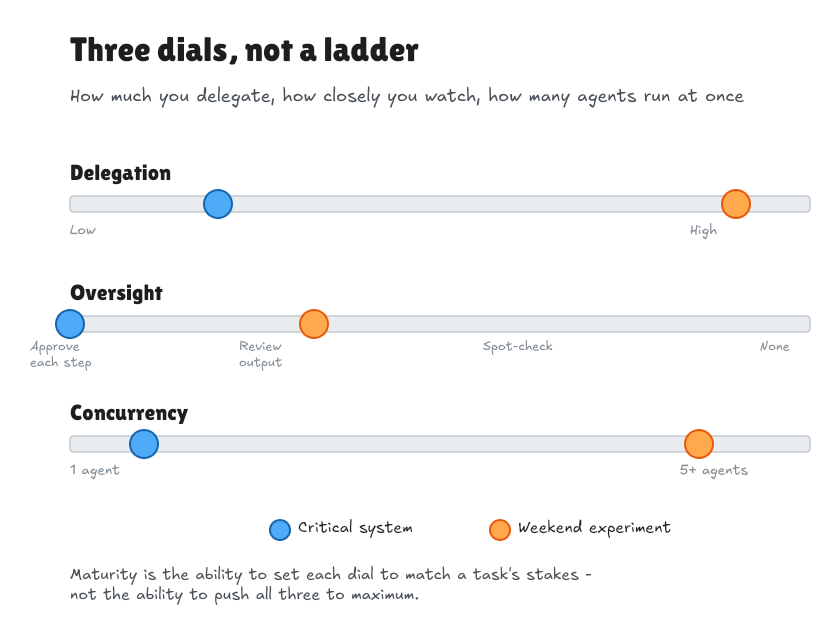
A mature project that wasn’t built for agents probably doesn’t need an agent swarm. Its value is in predictable behaviour and preserving existing contracts. More agents working at once can mean more overlapping changes to reconcile and review.
For stable software, I’d favour fewer agents, narrowly scoped tasks, small diffs, and deterministic checks: tests, types, linters, and repeatable builds. An experiment built around agents can justify more autonomy and concurrency. How much you delegate, how closely you review it, and how many agents you run should follow the needs of the project.
8. Everything gets centralised, but improving the loop is a team-level job
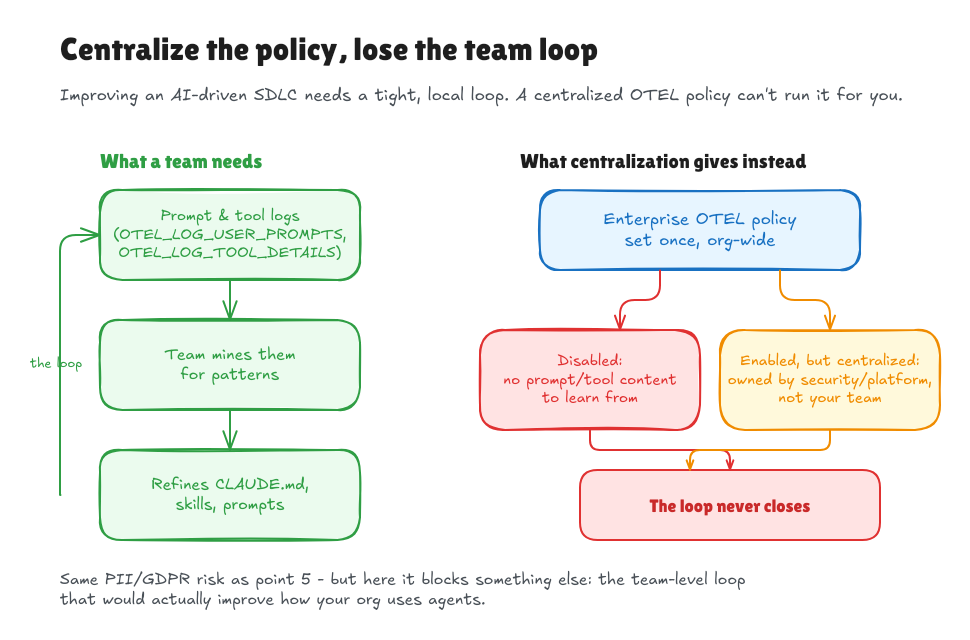 Edit this diagram on Excalidraw
We touched on centralisation — MCP risk acceptance in point 3, PII/GDPR in point 4 — but it’s worth calling out on its own, because it blocks the thing enterprises say they want: continuously improving their own AI-assisted SDLC.
Doing that well needs a tight, local loop: collect real prompt and tool-call logs for your team, look at what the agent got wrong or right, and use that to refine your CLAUDE.md, skills, and prompts. Claude Code has the telemetry for it — OTEL_LOG_USER_PROMPTS and OTEL_LOG_TOOL_DETAILS log the prompt text, bash commands, and MCP/tool arguments, alongside OTEL_METRICS_INCLUDE_VERSION for good measure:
"OTEL_LOG_USER_PROMPTS": "1",
"OTEL_LOG_TOOL_DETAILS": "1",
"OTEL_METRICS_INCLUDE_VERSION": "true"
Both content flags default to off, redacted otherwise, for good reason — that’s the same PII/IP exposure as point 4, generated by your own developers this time instead of pulled from production logs. So the org sets one policy for everyone: usually disabled outright, so nobody has the raw material to learn from; occasionally enabled but centralised into a security or platform team’s backend, so the team that generated the prompts can’t query their own data.
Either way, a large org has no structure for supporting many small, team-owned feedback loops running at once — it has one policy, decided centrally, applied everywhere. The loop that would make the enterprise better at this never gets to run.
9. Bug to fix, not a toll to pay
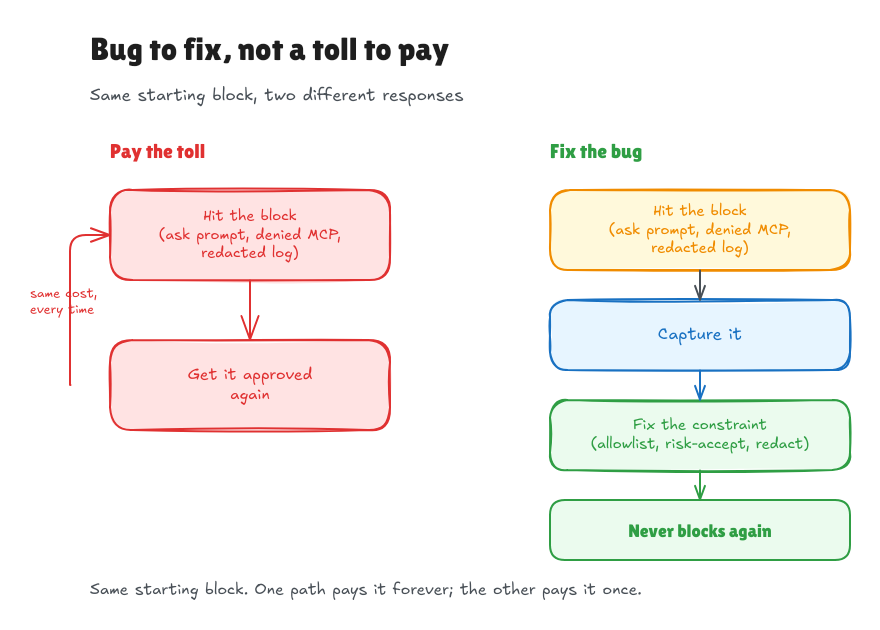 Edit this diagram on Excalidraw
Every block in the loop — an ask prompt, a denied MCP, a log that cannot be shared — should get captured and fixed, not paid again next time. Capture it, then fix the actual constraint behind it (widen the allowlist, get the MCP risk-accepted, redact the field properly) so the next run doesn’t hit the same wall. Auto mode’s own “Recently denied” list already works this way: it exists so you fix the environment entry once instead of re-approving the same command forever.
The same discipline works as a retro exercise: pull PR lead time next to the agent’s own chat and tool-call logs for that PR, and see where the wall-clock went — waiting on an ask prompt, the agent stuck on a false start, code review, CI. Whichever block ate the most time that cycle is the one to fix before the next. That’s the same team-level loop from point 8: it works only if the team has both the PR timestamps and its own chat logs to look at, not just one or neither.
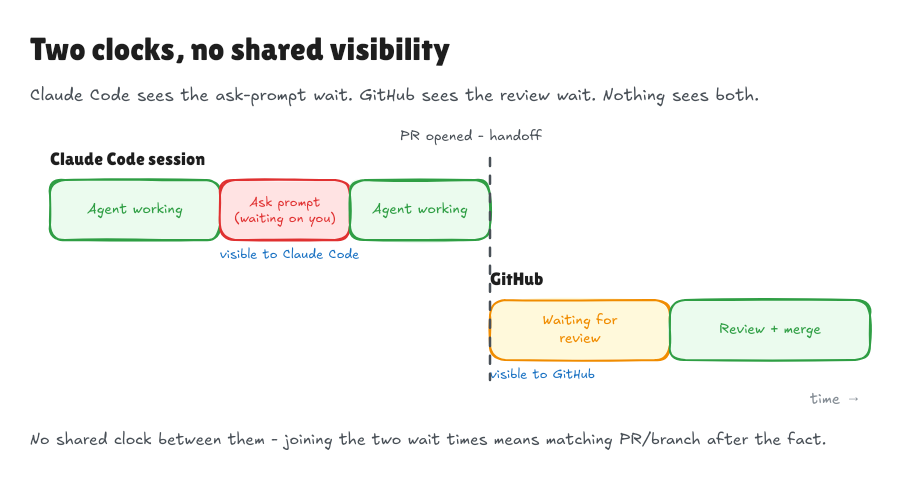 Edit this diagram on Excalidraw
That’s why it’s two retro data sources, not one: Claude Code’s own logs see only the in-session wait, an ask prompt sitting there until you reply. Once a PR is opened, that clock stops — review wait lives in GitHub’s timestamps, a system the harness has no visibility into. There’s no single log with both; you join them by PR or branch after the fact.
An enterprise that re-approves the same block over and over, instead of closing it out, is bleeding the loop’s velocity one approval at a time.
10. Approve = merge
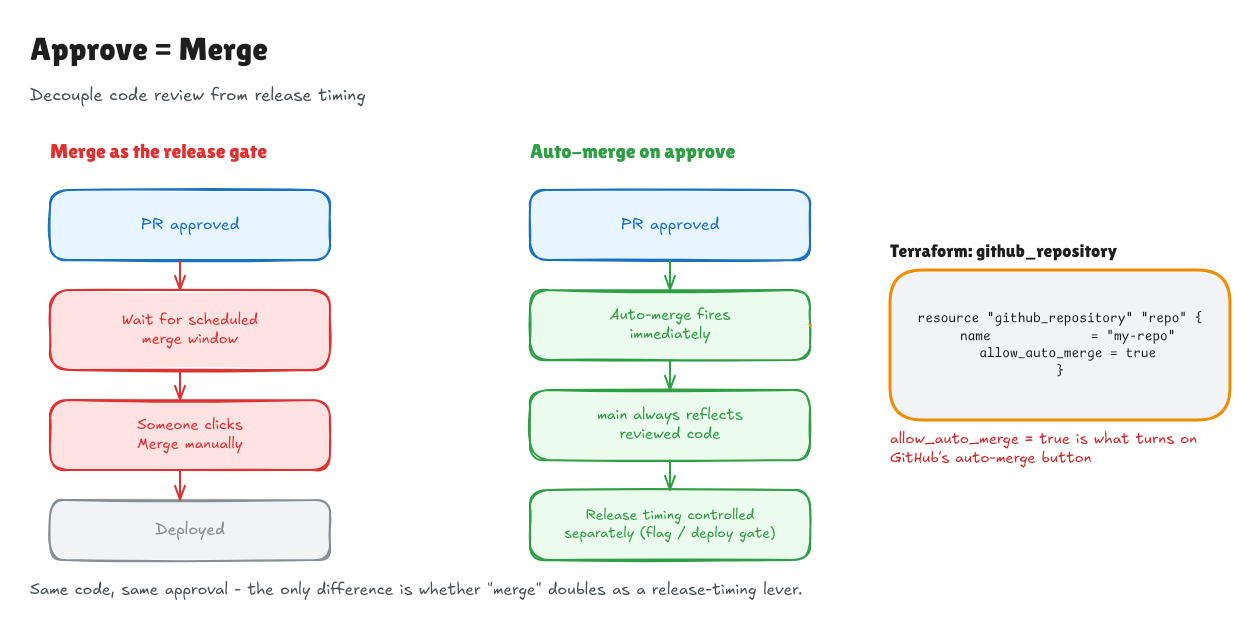 Edit this diagram on Excalidraw
The PR is approved. The checks have passed. But nobody hits Merge, so the code sits there until someone remembers. The decision is already made; the remaining delay is just a forgotten button.
Approve = Merge should be the default. Once all required approvals and checks are satisfied, merge automatically. Nobody should need to come back and perform a second manual action to carry out the decision they already made.
On GitHub, this Terraform setting makes auto-merge available for the repository:
resource "github_repository" "repo" {
  name             = "my-repo"
  allow_auto_merge = true
}
That setting alone doesn’t turn it on for every PR: auto-merge must also be enabled on each PR. Make that part of the normal workflow, so an approved change doesn’t sit waiting for a click.
11. Too Waterfall, AI psychosis instead of Agile
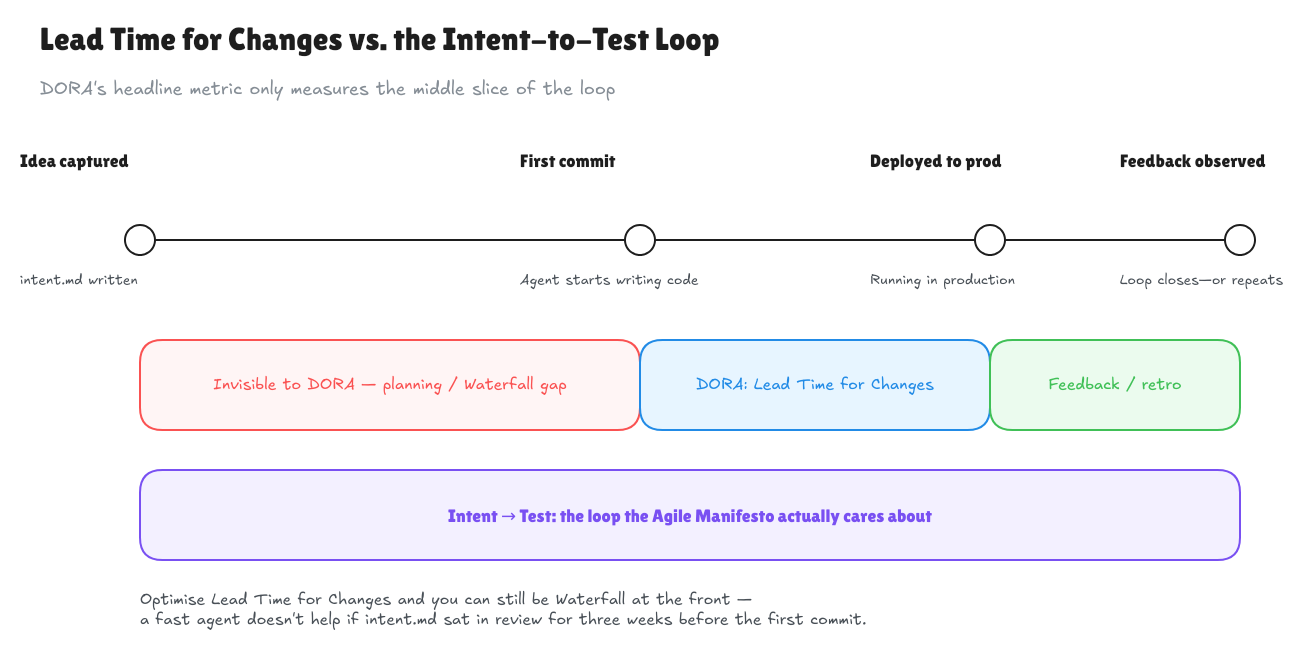 Edit this diagram on Excalidraw
intent.md gets treated as the artefact to get right up front — reviewed, signed off, revised through committee — when agents make being wrong cheap to recover from. That’s Waterfall wearing an AI costume: a phase-gated plan followed by a big-bang implementation, with an agent doing the typing instead of a dev team. Call it AI psychosis — the belief that a model needs a fully specified plan before it’s safe to let loose, when the point of agents is that “try it and see” is now nearly free. The Agile Manifesto said it before agents existed: “Responding to change over following a plan.” Capturing intent should stay lightweight — a paragraph, not a document — and the loop from idea to running code to feedback is worth protecting, not the plan that preceded it.
12. Less is more
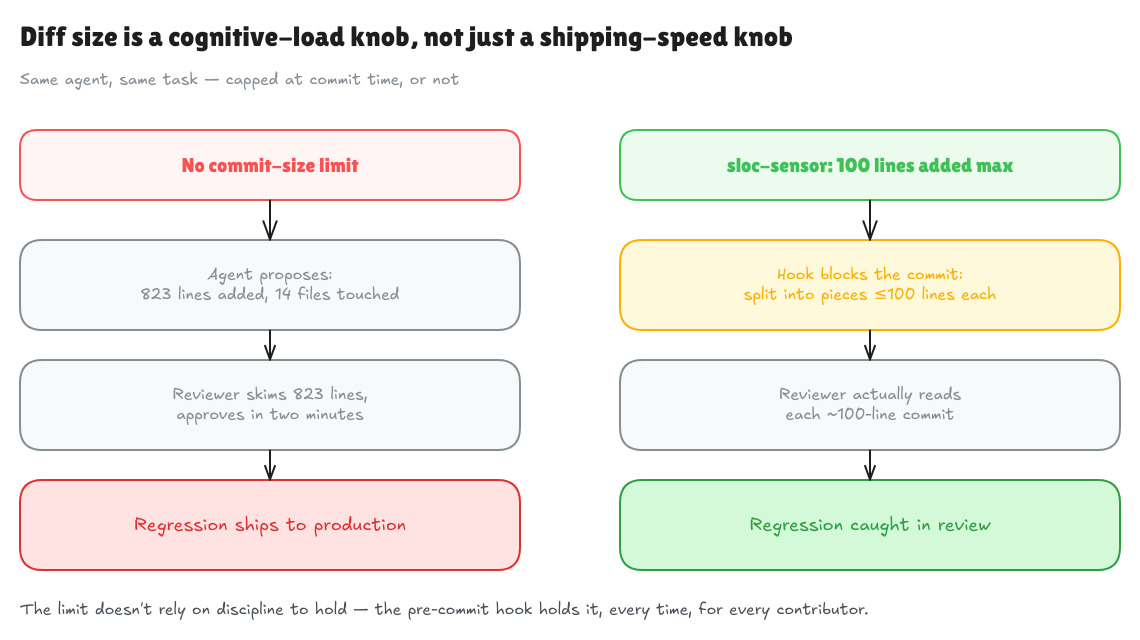 Edit this diagram on Excalidraw
Agents generate a lot of code — more files, more lines, more comments restating what a well-named function says. A reviewer can’t hold a 100+ line diff in their head, so they skim and rubber-stamp it, and the one decision that mattered goes unchecked.
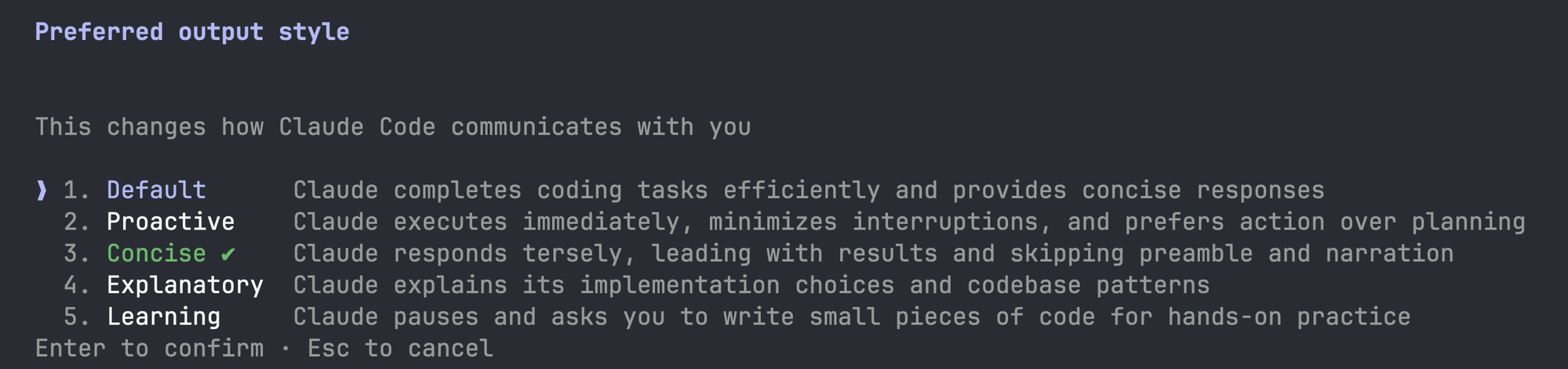 Claude Opus is too verbose by default — “Concise” is opt-in, not the default.
I use sloc-sensor: pre-commit hooks capping staged lines added, file length, and commit message length. Martin Fowler’s piece on sensors for coding agents makes the case — a mechanical limit holds where asking an agent nicely to be concise doesn’t.
But a pre-commit hook only catches git commits. Claude Desktop wired into Confluence over MCP can dump a wall of text onto a wiki page with nothing watching — there’s no staging area to block on. A mechanical sensor only works where a checkpoint exists; everywhere else, “less is more” has to be a value the org holds, not a hook it installed once.
13. Decisions become the bottleneck
Clare Liguori describes this inside Amazon, from 18:45 in her talk: when a product took nine to twelve months to build, two months deciding to build it and another two approving its launch were less conspicuous. Once implementation takes one or two months, those decisions dominate the timeline.
I’ve seen the same pattern with integrations. The code can be ready while you’re still finding the owner, agreeing access, working out credentials, and negotiating which data you can use. Then you repeat it for the next system. Sending everyone to a central team puts another queue in front of the same unanswered questions.
Naming an owner only gets you part of the way. There may be both a technical owner and a business owner: one can approve the connection while the other has to decide about the data and risk. Both need to agree on a path people can use:
- A narrow, read-only default, approved once and documented so the next team can connect without a ticket.
- A clear escalation path for write access, wider scope, or sensitive data.
- A maintained list of supported integration options, including credential requirements, performance limits, and who already uses them.
The owners keep that guidance and scope current as APIs and security requirements change. Routine integrations can then proceed without waiting for another decision; exceptions get the attention they need. That’s how faster coding becomes faster delivery.
Closing
A pattern shows through the specifics: a chain of approvers, a security committee, a platform team — each holds a piece of the decision, none holds the outcome. That’s not a model limitation or a tooling gap. It’s a missing owner.
Every fix needs clear ownership: authority to decide, accountability for the outcome, and a supported path others can use without asking again. Where technical and business ownership are separate, agreeing and maintaining that path is a shared responsibility. Split authority from accountability across a chain of approvers, and the faster implementation loop still ends in a queue.