Two Heat Pump Surprises: Cylinder Standing Loss and a −40 °C Outdoor Sensor
A month into living with a Vaillant aroTHERM plus: measuring how fast the hot water cylinder cools down, and the day a power cut left the outdoor sensor reading −40 °C and the heat pump heating the house in August.
A month on from our heat pump install, two things have caught me out. One is boring and expected, and I only noticed it because I was staring at graphs. The other cost 3.4 kWh in a single August afternoon and took four emails to Vaillant to explain.
1. The cylinder cools down faster than I assumed
The cylinder is set to 50 °C and charges on its own time program, 23:30–05:30, on the cheap Octopus rate. Once it stops charging, it just sits there losing heat.
Here’s a clean 25-hour run with no draw-off at all, straight out of Home Assistant:
| Tank temperature | |
|---|---|
| 18 Aug, 22:30 | 50.5 °C |
| 19 Aug, 12:30 | 45.0 °C |
| 19 Aug, 17:00 | 43.5 °C |
| 19 Aug, 23:30 | 41.0 °C |
That’s 9.5 °C over 25 hours — 0.38 °C/hour. On more typical days, where a bit of hot water does get used, the slope works out nearer 0.45 °C/hour, or about 10.8 °C/day. That’s the figure I sent to Reco Energy, asking whether it was normal. The answer came back:
Yes that is a normal decline and is as expected.
Which is fair enough. The cylinder lives in an unheated concrete plant room with stone walls, so it’s losing heat into a cold room all day.
Whether it matters depends on what you convert it into. Ours is a 200 litre cylinder, so 9.5 °C is about 2.2 kWh of heat per day. At the ~4.7 COP I measured on a hot water reheat, that’s under 0.5 kWh of electricity — roughly 3p a day on the 7p off-peak rate, call it £12 a year. As a money problem it’s noise.
As a temperature problem it’s more interesting, and it’s the real justification for the daytime boost automations I wrote about last time. A tank that finishes charging at 50 °C is at 43.5 °C by teatime. It’s still perfectly usable hot water, but the margin before someone gets a lukewarm shower is thinner than I’d assumed, and the reason to top up mid-afternoon isn’t to save money — it’s to avoid having to buy the recovery at 30p/kWh in the evening.
2. −40 °C, and the heat pump heating the house in August
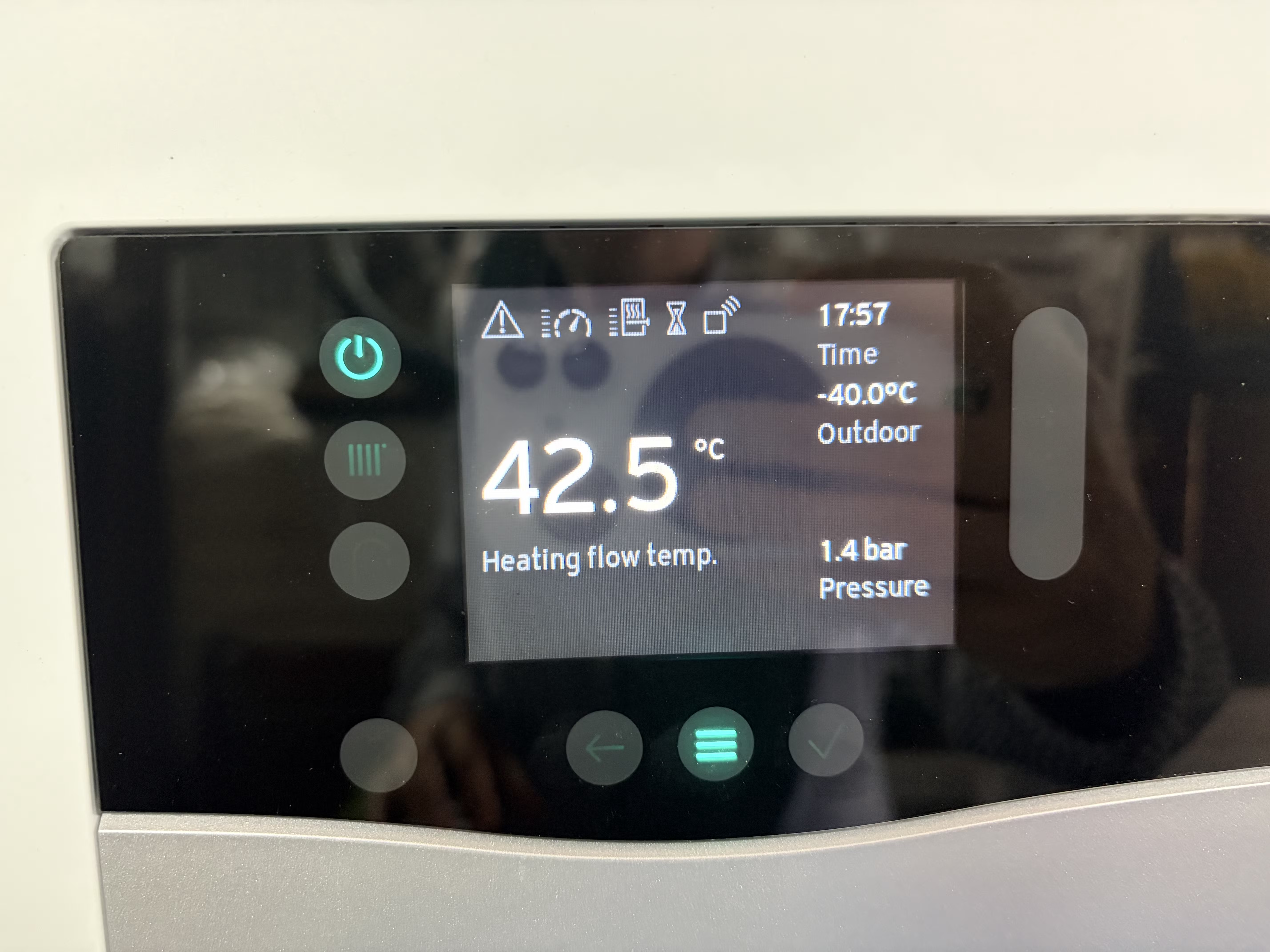
Sunday 23 August. After a power cut, the sensoCOMFORT came back reading −40.0 °C outdoors. −40 is where Celsius and Fahrenheit meet, which is a good hint that it isn’t a measurement at all — it’s the sentinel value for “no reading”.
The controller believed it. Look at the rest of that screen: 42.5 °C heating flow temperature, at 17:57, in August. The weather compensation curve was being fed −40 °C, so the system decided the house was about to freeze and started pumping heat into it.
Home Assistant has the whole afternoon on record. The Vaillant integration dropped out at 10:56 and came back at 11:43 with the flow temperature already at 45 °C, climbing to 51.5 °C by 12:22. It then sat between 35 °C and 48 °C for the rest of the day and peaked at 58 °C just before 23:00, before coasting back to normal in the early hours of the 24th. The zone sensor was reading 21.6 °C indoors throughout.
The heat pump’s own daily counters put a number on it:
| 23 August | |
|---|---|
| Electricity consumed, heating | 3.4 kWh |
| Heat generated, heating | 16.6 kWh |
| Compressor runtime | 6.4 h |
| On/off cycles | 6 |
A COP of 4.9, which would be a lovely figure in January. In August it’s 16.6 kWh of heat dumped into a house that was already 21 °C, for about a pound of peak-rate electricity. The outdoor reading only returned to something sane — 16.0 °C — at 20:32, nine and a half hours later.
What Home Assistant did and didn’t catch
The useful lesson here is about what to alert on.
Home Assistant never showed −40. sensor.cottage_outdoor_temperature went unavailable at
10:56 and stayed unavailable until 20:32, when it reappeared at 16.0 °C. Any automation I’d
written to catch an implausible number — below: -20, say — would have sat there doing nothing
for the entire event. The state to watch for is unavailable, and specifically an unavailable
that outlives the rest of the integration: everything else came back at 11:43, and this one entity
didn’t.
I also want to flag a trap I set for myself. I have a sensor.cottage_outside_temp template
sensor that reads 17.43 °C right now against the Vaillant entity’s 17.4 °C. It looks like
corroboration and it is nothing of the sort — it’s derived from the same physical sensor, so it
would have agreed with −40 just as happily. The genuinely independent evidence that something was
wrong was the flow temperature and the energy counters: the heat pump was doing something
expensive, and that’s much harder to fake than a temperature reading.
Vaillant support, in four acts
I raised issue CC-294844 with Vaillant’s connected app support, since Reco were away for the week and I had no idea who else to ask.
First reply: a link to the myVAILLANT app user guide PDF.
Second reply, after I sent the photo of the controller:
Only when the location has not been set correct in the app (Location Map)
PL30 4HZ 08:00 Temp 16°c Feels Like 18°c Cloud 91% Humid 72% Air Pressure 1010mb
They’d looked up a weather forecast for my postcode. This one genuinely confused me for a while: the implication is that the outdoor temperature shown in the app comes from the address you set on the map, not from the sensor bolted to the wall.
Third reply, after I sent a photo of the sensor itself — and this is the one that actually explains it:
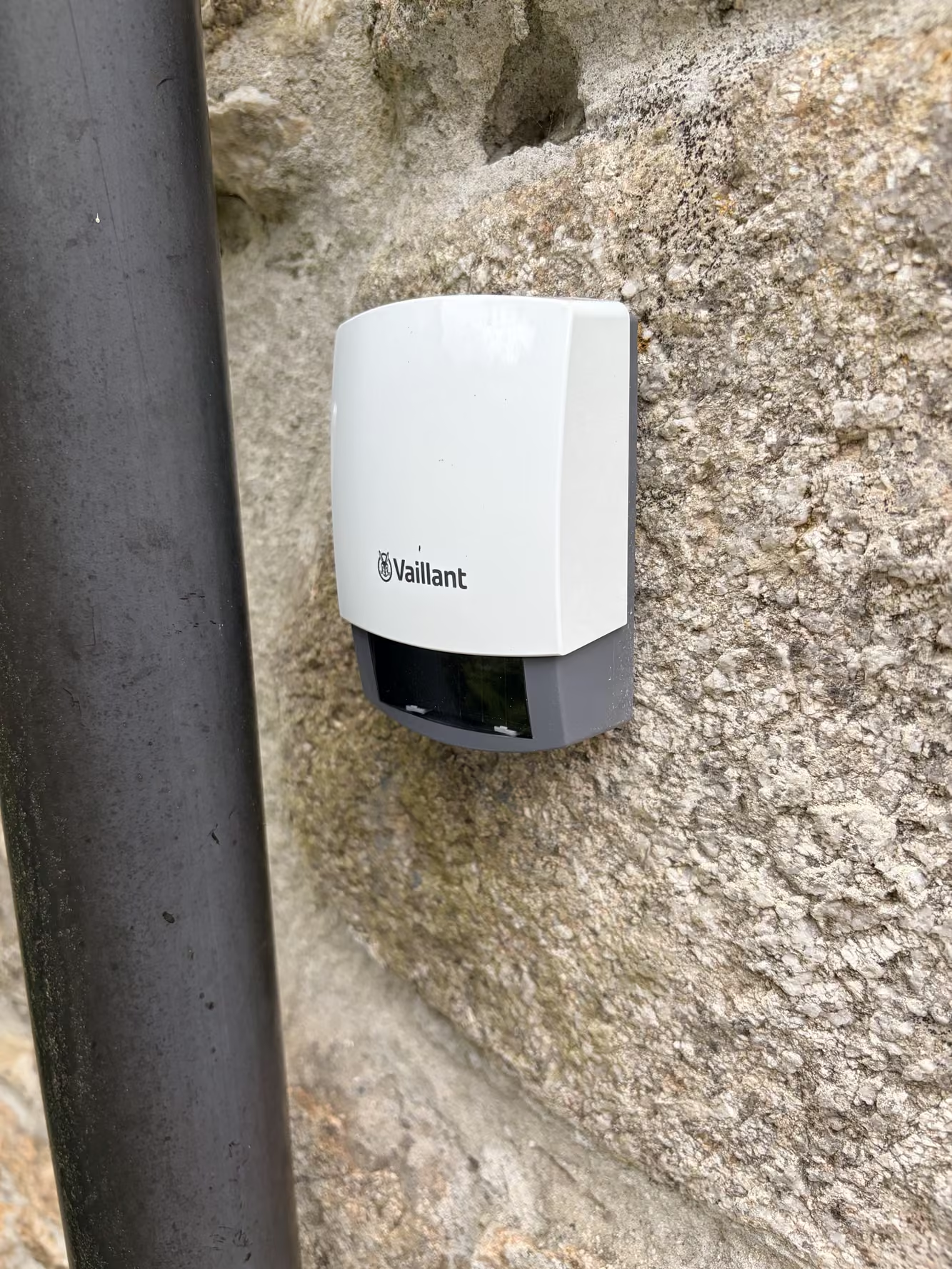
You have a VRC 720 sensoCOMFORT wireless controller that comes with an external wireless thermostat. If -40 appears as the temperature for the external thermostat, then the wireless would have dropped from the thermostat.
With a diagnostic: MENU → Settings → Installer level → Code 00 → Installation configuration → Radio link, where the outdoor sensor’s signal strength should read greater than 4.
So −40 isn’t a broken sensor, it’s a lost radio link, and the power cut knocked it out for nine hours. That also corrects something I got wrong in the original post, where I described the outdoor sensor as “wired back to the controller” — it isn’t. There’s no cable in the photo, because there is no cable. I’ve fixed that post.
Vaillant also quoted the siting rules from the manual, which are worth having in one place:
Choose an installation site that generally meets the following requirements: not fully protected from wind – not particularly draughty – not in direct sunlight – not affected by heat sources – on a north or north-west facing façade – in buildings with up to three floors, it should be located two-thirds of the way up the façade
Ours is on a north-facing wall, which is right, but at ground level next to a downpipe on a thick-walled stone cottage — nowhere near two-thirds up the façade, and with a lot of granite between it and the controller. I’ll check the radio link signal strength next.
The fourth reply, which answers the real question
I wrote back with the Home Assistant timeline above and four questions. Vaillant answered all four.
The installer code is 00 by default, and “in domestic properties we advise installers not to change this” — with a warning attached: if it has been changed and you can’t produce it, not even Vaillant’s own technical support can get in. The controller has to be factory reset and the installer has to reconfigure it for your system design.
Nine and a half hours is not expected:
After a power cut or disabling the power the controller and the external thermostat should establish a connection to the base station within 5 to 10 minutes. If a signal is weak this could delay the reconnection.
Which points straight back at the siting. There’s a manual re-pair if you don’t want to wait: a paperclip into the small hole in the back of the external sensor, held 3–5 seconds until the light flashes, then within 30 seconds hold the button on the front of the wireless receiver for 3–5 seconds. When its light goes solid, check the outside thermostat signal reception on the controller. Failing that, bring the sensor indoors and let it reconnect close to the base station.
And the question I actually cared about — should the controller be acting on −40 °C at all?
If the connection to a wired or wireless thermostat is lost the[n] there is no weather compensation available - so the -40 is used for the heat curve
That’s a design statement, not a fault report. I had assumed −40 was a sentinel the controller would recognise and discard. It isn’t. The sensor is a thermistor — resistance rises as it gets colder, 1128 Ω at 20 °C, 2167 Ω at −25 °C — and a dead radio link falls off the bottom of that curve. The heat curve then consumes −40 like any other number. There is no setting to hold the last valid reading, and no way to suspend weather compensation when the sensor is missing.
On alerting, the answer is the one that bothers me most:
If an external thermostat signal connection is broken/lost code 2 (M2) should appear on the thermostat which sends the code to the app […] I does appear that when the power came back on the controller acted as if there was no external thermostat setup
So there is a fault code for exactly this, and it didn’t fire, because after the power cut the controller behaved as though no outdoor sensor had ever been configured — while still feeding −40 into the heat curve. A missing sensor is silent; a phantom −40 °C one is expensive. Vaillant did note that a different fault on the same day, 9998 on the heat pump interface, made it to the app fine, so the notification path itself works.
They’ve passed the details to their development teams.
Takeaways
- Measure your own standing loss before asking whether it’s normal. “Is this normal?” gets you a yes. “It’s 0.45 °C/hour, is that normal?” at least gets you a yes about the right number.
- Alert on
unavailable, not on absurd values. The bad number never reached Home Assistant. A stale or missing sensor is the more common failure, and the quieter one. - A second sensor derived from the first is not a second opinion. Cross-check against a different kind of measurement — energy, runtime, flow temperature — not a different name for the same reading.
- The heat curve has no sanity check. Vaillant confirmed it: lose the outdoor sensor and −40 °C goes into the weather compensation curve as a real number. There’s no hold-last-value setting, so a dropped radio link is a heating bill.
- Work out your escalation path before you need it. Installer for the hardware, Vaillant’s app support for the controls and the app. It took four emails: the third one identified the cause, and the fourth admitted the M2 fault code that should have warned me never fired.